
| TL;DR — Quick answer
Mobile-friendly 3D configurators in 2026 require fundamentally different design thinking than desktop versions — not just smaller layouts. The nine essential UX best practices include performance-first design (60fps on mid-range Android), generous touch targets, simplified single-thumb navigation, smart material previews instead of overwhelming swatches, progressive disclosure of options, gesture conventions that match user expectations, fast initial load times, accessible labelling, and intelligent fallback handling. Brands that get mobile UX right convert dramatically better than those treating mobile as an afterthought. |
There is an uncomfortable truth in 3D configurator development that most agencies do not talk about. A configurator that looks stunning on a developer’s 27-inch monitor often performs poorly on the device most buyers actually use — a mid-range Android phone that is two or three years old. The configurator stutters. The interface feels cramped. Touch targets are too small. Materials take forever to load. And the buyer abandons before reaching the customization moment that drives commerce. That mobile gap is where most configurator projects quietly fail commercially, regardless of how impressive they look in agency demo reels.
Mobile-friendly configurator design is not about shrinking the desktop experience down to fit a smaller screen. It is a fundamentally different design discipline — driven by different constraints, different user behaviours, and different success metrics. This guide explains the nine UX best practices that separate mobile configurators that convert from mobile configurators that frustrate, with specific guidance for designers, product managers, and developers working on 3D configurator projects in 2026.
Why does mobile UX matter so much for 3D configurators?
Mobile traffic now dominates e-commerce browsing across virtually every category. Furniture, fashion, automotive, jewellery, watches, footwear, and even property — the categories where configurators add the most value — all see well over half of their traffic from smartphones. The buyer journey typically starts on mobile during a commute, continues on mobile during downtime, and only sometimes shifts to desktop for the final purchase decision. A configurator that fails on mobile loses the entire top of the funnel.
The technical challenge is real. Real-time 3D rendering is computationally expensive. Photoreal materials require significant memory. Touch interaction has different ergonomics than mouse interaction. Mobile networks have higher latency than fibre broadband. Battery and thermal constraints affect sustained performance. Every one of these factors adds friction that desktop configurator design simply does not have to address. The studios that consistently deliver mobile-friendly 3D configurators for commerce brands treat mobile constraints as primary design drivers, not retrofits.
How to design mobile-friendly 3D configurators: 9 essential UX practices
Apply these nine practices to any 3D configurator project intended to work on smartphones. Skipping any one of them is usually the difference between a configurator that converts and one that frustrates.
1. Engineer for performance on mid-range devices, not flagships
The most common mistake in configurator design is testing only on the development team’s latest iPhones and Pixel flagships. Most actual buyers use mid-range Android phones from two or three years ago — devices with less powerful GPUs, less RAM, and more thermal throttling. The configurator must run at sustained 60 frames per second on these realistic devices. That target drives every other decision about asset complexity, material fidelity, and rendering pipeline. If your configurator drops below 30fps on a mid-range device, the experience feels broken regardless of how beautiful it looks.
2. Design touch targets larger than you think you need
Mobile UX guidelines suggest minimum touch targets of 44×44 points on iOS and 48×48 dp on Android. Configurator interfaces should treat these as absolute minimums, not aspirations. Material swatches, colour pickers, option toggles, and primary actions should all be substantially larger — often 56×56 dp or more — because users tap them while holding the phone single-handed, often while walking, on a moving train, or with cold fingers. A touch target that feels generous on screen often turns out to be barely adequate in real use.
3. Optimise for single-thumb operation
Most mobile users hold their phone in one hand and operate it with that hand’s thumb. This means everything important must be within thumb reach — which corresponds to the bottom and middle portions of the screen, not the top. Place primary configuration controls along the bottom edge. Reserve the top of the screen for less-frequently-used controls and the 3D model display. Configurators that put critical controls at the top force two-handed operation, which dramatically reduces engagement and conversion.
4. Replace overwhelming swatch grids with smart material previews
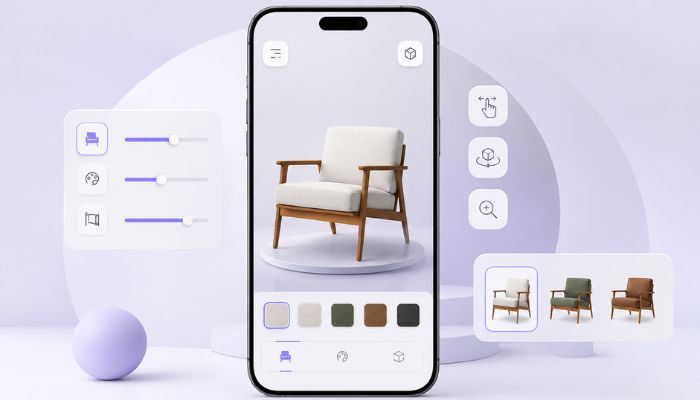
Desktop configurators often display large grids of material swatches — sometimes thirty or forty fabric options visible at once. On mobile, this approach fails badly. The swatches become unrecognisably small, and the grid creates decision paralysis. Instead, group materials by category (leathers, fabrics, performance materials), show four to six options at a time, and let users swipe between categories. Each visible swatch can then be large enough to convey actual texture and colour, dramatically improving the configuration experience.
5. Use progressive disclosure to avoid overwhelming users
A configurator with twenty customization options visible simultaneously overwhelms mobile users immediately. Progressive disclosure — revealing options in logical sequence rather than all at once — solves this. Start with the most impactful decisions (base style, primary colour). Reveal secondary options (materials, finishes) after those are made. Tertiary options (monogramming, accessories) appear last. This staged approach reduces cognitive load while still offering the full customization depth desktop users would expect.
6. Respect established gesture conventions
Mobile users have strong expectations about how gestures work. Pinch zooms. Two-finger rotate rotates. Single finger drags the camera. Swipe transitions between options. Tap selects. Long press opens detail. Configurators that invent new gesture conventions — even slightly — confuse users immediately because the new gestures conflict with the conventions reinforced by every other app the user has installed. Stick to established patterns. Innovation should happen in the experience, not in the controls.
7. Engineer aggressive initial load times
Mobile users abandon at remarkably low loading times — significantly faster than desktop users. The first meaningful frame of the configurator should appear within two to three seconds maximum, even on a slower mobile network. This usually requires aggressive asset optimization, progressive loading (basic geometry first, materials and details streamed in afterward), and clear loading state communication. A configurator that takes ten seconds to load loses most of its mobile audience before it has shown anything.
8. Label everything accessibly
Mobile screens have less space for explanatory text, but labels remain critical for accessibility, screen readers, and clarity. Icons alone are not sufficient — users struggle to interpret unfamiliar icons without supporting text labels, particularly older users and non-native speakers. Every interactive element should have either a visible text label, an accessible name for screen readers, or both. Premium luxury configurators sometimes break this rule for aesthetic purity; the result is consistently lower conversion among demographics outside the brand’s core audience.
9. Handle failure states gracefully
Mobile experiences fail in ways desktop experiences rarely do. Network connections drop. Devices thermal throttle and slow down. Available memory tightens as other apps compete. Battery saver modes restrict performance. Mobile-friendly configurators anticipate these conditions and degrade gracefully — reducing rendering fidelity when device is constrained, showing meaningful error messages when assets fail to load, and offering fallback to simpler visualization when full 3D is not feasible. The configurator should fail well, not just succeed beautifully.
| A practical reality check
Mobile-friendly configurator design requires testing on real consumer devices throughout development, not just at the end. The most reliable approach is maintaining a test bench of mid-range Android phones from the past three years and testing every release on all of them. Studios that only test on the latest iPhones consistently ship configurators that look great in demos and fail in actual user hands. |
What technologies enable mobile-friendly 3D configurators in 2026?
The technical foundation matters as much as the UX design. The right technology choices make mobile-friendly configurator design achievable; the wrong choices make it impossible regardless of how well the UX is designed.
WebGL with Three.js or Babylon.js
WebGL remains the dominant technology for browser-based 3D configurators in 2026. Three.js and Babylon.js are the two leading JavaScript engines that abstract WebGL complexity into manageable APIs. Both run well on mobile when configurators are built with mobile constraints in mind. The choice between them is mostly preference; both deliver excellent mobile performance when used correctly.
WebGPU for higher-fidelity experiences
WebGPU is the emerging successor to WebGL — offering better performance and more advanced rendering features. Browser support is still maturing in 2026, particularly on iOS Safari, but WebGPU represents the future of mobile web 3D. Configurators built today should consider WebGPU compatibility for the next refresh cycle.
Native mobile rendering pipelines
For brands building dedicated mobile apps rather than web configurators, native rendering pipelines (Metal on iOS, Vulkan on Android) deliver the highest possible performance. Studios offering integrated app development services can build native configurator apps with significantly better mobile performance than equivalent web configurators — particularly valuable for premium luxury, automotive, and high-end fashion.
Hybrid configurator and AR experiences
The most sophisticated mobile configurators in 2026 combine traditional configuration with augmented reality preview. Buyers configure their product in a standard configurator interface, then tap to view the finished design in their physical space using their phone camera. This integration with AR development delivers dramatically better commercial outcomes for furniture, fashion, and home goods brands than configuration alone.
Common mistakes that hurt mobile configurator UX
Beyond the practices above, certain specific mistakes consistently appear in failed mobile configurator projects. Watching for these mistakes in design reviews catches problems before they reach users.
- Hiding critical controls behind ambiguous icons or in nested menus that require multiple taps to reach
- Using hover states that simply do not work on touch devices — losing all the feedback they provide on desktop
- Letting the 3D model display dominate the screen while squeezing controls into impractically small areas
- Requiring text input for monogramming or personalization without optimizing for mobile keyboards
- Failing to support landscape orientation, particularly important for tablet users and detailed configuration review
- Showing loading spinners without explaining what is loading, how long it will take, or what the user can do meanwhile
- Disabling browser zoom and pinch-zoom, breaking the accessibility expectations of users with vision impairments
None of these mistakes are technically difficult to avoid. They appear in configurator projects when teams treat mobile as an afterthought or when designers without mobile-specific experience lead the project. Studios building configurators specifically for mobile from the start avoid these issues systematically.
| Planning a mobile-friendly 3D configurator?
Ink n Algorithm designs and develops 3D web configurators, native mobile apps, and integrated AR experiences for commerce brands across the United States and internationally. We engineer for real mobile devices throughout development, not just at the end. Tell us about your project at https://inknalgorithm.com/contacts/ and a senior team member will respond within one business day. You can also explore recent configurator and immersive projects in our portfolio. |
Frequently asked questions
What frame rate should a mobile 3D configurator maintain?
A mobile 3D configurator should maintain sustained 60 frames per second on mid-range Android devices from the past three years. Frame rates dropping below 30fps create visibly stuttering interactions that feel broken to users, regardless of how beautiful the underlying 3D content is. The 60fps target should be measured on realistic test devices under realistic conditions — not on the development team’s latest flagships in controlled environments.
How long should a mobile configurator take to load?
The first meaningful frame of the configurator should appear within two to three seconds on a typical mobile network connection. Progressive loading helps — showing basic geometry quickly while higher-fidelity materials and textures stream in afterward. Total load to fully ready state should ideally stay under six to eight seconds. Mobile users abandon at remarkably low loading times, so initial perceived speed matters even more than total load time.
Should mobile configurators support landscape orientation?
Yes, particularly for tablet users and for detailed configuration review on larger phones. Landscape orientation provides more horizontal screen real estate for showing the 3D model alongside customization controls simultaneously. However, the primary design target should be portrait orientation since that is how most users hold their phones, with landscape as a supported enhancement rather than the primary experience.
How do you test mobile configurator UX properly?
Test on a bench of real consumer devices spanning the past three years, particularly mid-range Android phones. Test under realistic conditions — varied network speeds, different lighting, single-handed use, with the phone in a case. Conduct user testing with actual target customers, not just internal team members who know the configurator’s intended behaviour. Watch for hesitation moments, abandoned flows, and confusion patterns. Real-user friction reveals UX problems that internal testing misses.
Should mobile configurators be built as web or native apps?
Web configurators (WebGL) win on reach because they require no app download and work on any device with a modern browser. Native apps win on visual fidelity and performance because they have deeper access to device GPU capabilities. For most commerce use cases, web configurators are the right choice because reach matters more than incremental fidelity gains. For premium luxury, high-end automotive, and brands building deep customer relationships, native apps justify their additional friction with significantly better mobile experiences.
How do mobile and desktop configurator UX differ fundamentally?
Mobile UX prioritises single-thumb operation, large touch targets, progressive disclosure of options, performance-first asset budgets, and graceful degradation under constrained conditions. Desktop UX can assume two-handed operation with mouse precision, smaller interface elements, all options visible simultaneously, higher-fidelity assets, and consistent performance. Treating mobile as a scaled-down desktop experience consistently produces poor mobile UX. Mobile-first design — starting with mobile constraints and adding desktop enhancements — produces better outcomes on both platforms.
Ready to get started? Contact Ink & Algorithm to discuss your project—we’ll help you create results that drive sales.
FAQ
How much does to design mobile-friendly 3d configurators cost?
The cost varies based on project scope and complexity. Contact us for a custom quote tailored to your specific needs.
How long does to design mobile-friendly 3d configurators take?
Typical projects take 2-8 weeks depending on scope. We provide detailed timelines during consultation.
Do you work with US brands?
Yes, we work with US brands across all 50 states. Our team understands the US market and delivers solutions that drive results.