
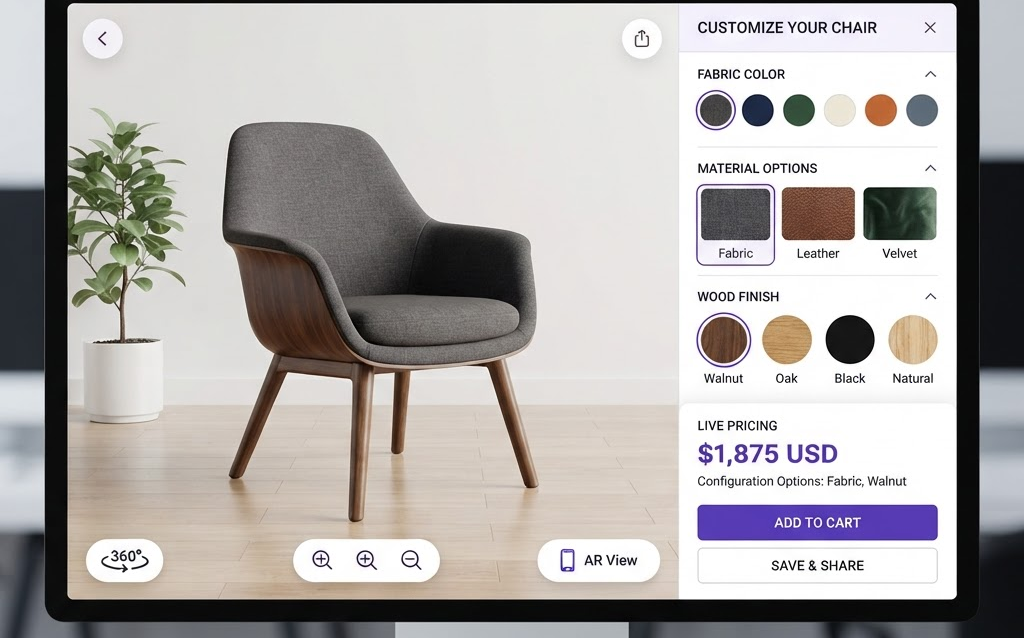
TL;DR: A product configurator is an interactive 3D tool that lets customers customize products in real time—swapping materials, colors, dimensions, and components while seeing instant visual updates. Brands using configurators report 40–94% higher conversion rates and 20–30% higher average order values. This guide covers every feature, technology choice, cost, and ROI metric you need to build a successful product configurator in 2026.
Product configurators have evolved from simple color pickers into sophisticated 3D experiences that let shoppers customize every aspect of a product before buying. Whether it’s a sofa with swappable upholstery, a bicycle with custom component colors, or a watch with interchangeable straps and finishes—configurators turn passive browsing into active engagement, and that engagement drives sales.
This is the complete guide to product configurator development in 2026. We cover what features matter, which technologies to choose, what it costs, and how to measure ROI. Whether you’re building your first configurator or upgrading an existing one, this guide gives you the full picture.
What Is a Product Configurator?
A product configurator is an interactive application that lets customers customize a product by selecting from available options—materials, colors, sizes, components, and features—while viewing the result in real-time 3D. The configurator validates combinations (preventing incompatible selections), calculates pricing as options change, and lets the customer save, share, or purchase the configured product.
The core value proposition is simple: customers who customize are customers who commit. When a shopper builds “their” version of a product, they develop ownership over the decision. That psychological investment translates to higher conversion rates, larger order values, and fewer returns because the customer chose exactly what they wanted.
Essential Features of a Modern Product Configurator
Real-Time 3D Visualization
The configurator must render material and color changes instantly—under 200ms per change. If the customer clicks a fabric swatch and waits 3 seconds for the render to update, the experience feels broken. Modern configurators use GPU-accelerated rendering (WebGL, WebGPU, or native engines) to achieve 60fps with instant material swaps.
360° Rotation and Zoom
Customers need to see the product from every angle. Smooth 360° rotation with momentum and gesture support (drag to rotate, pinch to zoom on mobile) is table stakes. The configurator should allow zooming into fine details—stitching on leather, grain on wood, finish on metal—to build confidence in the product quality.
Material and Color Swapping
The core interaction. Customers select from a palette of materials and colors, and the 3D model updates instantly. Advanced configurators support multi-zone configuration—changing the frame, seat, and legs of a chair independently, or the case, dial, and strap of a watch separately.
Dimension and Size Customization
For made-to-measure products (furniture, cabinetry, clothing), the configurator should allow dimension adjustments with real-time geometry updates. A customer entering a custom width for a table should see the table stretch in real time, with pricing updating proportionally.
Component Add/Remove
Modular products need component-level configuration. A customer configuring a shelving system should be able to add shelves, change bracket types, and remove back panels—with the 3D model and pricing updating in real time.
Live Pricing Updates
Every configuration change should instantly update the price. Customers need to see how each option affects the total—no surprises at checkout. Advanced configurators show base price, option surcharges, and running total simultaneously.
AR Placement
The customer should be able to place their configured product in their real space using AR. This is especially powerful for furniture, decor, and large items where size and fit matter. The AR view uses the same 3D model and materials from the configurator, ensuring what the customer sees in AR matches what they configured.
Save, Share, and Purchase
Customers should be able to save their configuration for later, share it via link or social media, and add the configured product to their cart with all custom options preserved. The saved configuration should generate a unique URL that loads the exact state when revisited.
Technology Stack: What Powers a Product Configurator
3D Rendering Engine
| Engine | Platform | Cost | Best For |
|---|---|---|---|
| Three.js | Web (browser) | Free | Most ecommerce configurators |
| model-viewer | Web (Google) | Free | Simple product viewers + AR |
| PlayCanvas | Web | Free–$2K/mo | Mid-complexity web configurators |
| Unity | Web, iOS, Android | Free–$2K/yr | Cross-platform, complex scenes |
| Unreal Engine 5 | Desktop, Cloud, Mobile | Free (royalty after $1M) | Premium photorealistic quality |
For most brands, Three.js is the starting point—it’s free, works in every browser, and has the largest community. Upgrade to Unity for cross-platform native apps or Unreal Engine for film-grade visual quality.
3D Asset Format
glTF/GLB is the web standard. Use Draco mesh compression to reduce file sizes by 70–90%. Target under 5MB total per product for mobile performance. One base model per product handles all material variants—no need for separate models per color.
Backend and Pricing Engine
The backend stores product definitions, option compatibility rules, pricing logic, and saved configurations. Common stack: Node.js + PostgreSQL or direct integration with Shopify/WooCommerce APIs. The pricing engine calculates the total based on selected options, applying surcharges, bundle discounts, and volume pricing.
E-Commerce Integration
The configurator must pass the final configuration to checkout. This means generating a unique variant ID or line item with all selected options, passing custom dimensions, and ensuring the order includes manufacturing instructions for custom products.
Development Cost by Complexity
| Configurator Type | Features | Cost | Timeline |
|---|---|---|---|
| Basic (single product) | 3D viewer, color swap, pricing | $5,000–$20,000 | 2–4 weeks |
| Standard (multi-zone) | Multi-zone config, AR, save/share | $20,000–$60,000 | 4–8 weeks |
| Advanced (multi-product) | CMS, multi-SKU, e-comm integration | $60,000–$150,000 | 8–16 weeks |
| Enterprise (platform) | Full catalog, API, analytics, multi-brand | $150,000–$500,000+ | 16–32 weeks |
ROI: How Brands Measure Configurator Success
The key metrics that prove a configurator’s ROI:
- Conversion rate lift — comparison of conversion rates for products with vs without configurator. Typical lift: 40–94%.
- Average order value increase — configurable products typically see 20–30% higher AOV as customers add premium options.
- Return rate reduction — customers who configure are more confident in their choice, reducing returns by 15–35%.
- Time on page — configurators increase average session time from 30 seconds to 3–5 minutes.
- Social sharing rate — saved/shared configurations drive organic traffic and word-of-mouth.
- Lead quality (B2B) — configured quote requests convert at higher rates and with larger deal sizes.
FAQ: Product Configurator Development
How much does a product configurator cost in 2026?
A basic single-product web configurator with color swapping and live pricing costs $5,000–$20,000. A standard multi-zone configurator with AR and save/share costs $20,000–$60,000. Enterprise-grade multi-product platforms with CMS and analytics run $150,000–$500,000+. The 3D models for each product cost $300–$2,000 separately.
How long does it take to build a product configurator?
A basic configurator can be built in 2–4 weeks. Standard multi-zone configurators take 4–8 weeks. Enterprise platforms with full catalog support take 4–8 months. The 3D asset creation (modeling, texturing, optimization) often runs in parallel with development and is the primary timeline driver.
Can a product configurator work with my existing e-commerce platform?
Yes. Configurators integrate with Shopify, WooCommerce, BigCommerce, Magento, and custom platforms through their APIs. The configurator embeds into your existing product pages and passes the configuration to the cart as a variant or line item. Most platforms support custom product variants for configurable items.
Do I need a 3D model for every product variant?
No. One base 3D model per product handles all material and color variants through texture and material property swaps. Structural changes (different legs, added modules) require additional model parts, but these are components of the same model—shown or hidden based on selection—not separate models.
What’s the ROI of a product configurator?
Brands implementing configurators typically see 40–94% higher conversion rates, 20–30% higher average order values, and 15–35% lower return rates. For a product with $100,000/month in revenue, a 50% conversion lift translates to $50,000 additional monthly revenue—paying back a $40,000 configurator investment in under a month.
Getting Started
Start with your best-selling product. Build a web-based configurator with Three.js, integrate it into your existing product page, and measure the conversion lift over 30 days. If the data supports it—and it almost always does—scale to your full catalog.
Ready to build a product configurator? Contact Ink & Algorithm to discuss your project—we’ll help you architect, design, and deploy a configurator that transforms how customers shop.