
TL;DR: AR home improvement tools let customers visualize renovations before they start—placing new cabinets, flooring, paint colors, and furniture in their actual rooms through their phone camera. US home improvement brands using AR report 35% higher conversion, 30% fewer project cancellations, and 25% larger project scopes. Here’s how AR is transforming the home improvement industry in 2026.
Home improvement is a high-stakes purchase. A kitchen renovation costs $15,000–$50,000. New flooring for a house runs $5,000–$20,000. Customers hesitate because they can’t visualize the result—will white cabinets look good with my countertops? Will this flooring match my walls? Will this furniture fit in my space?
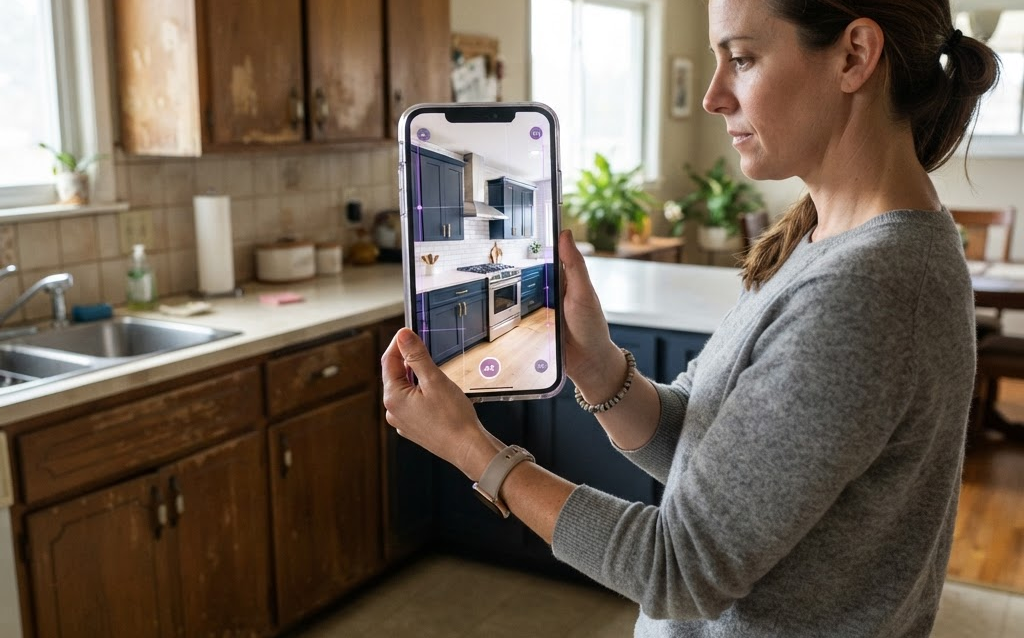
AR solves this by letting customers see renovations in their actual rooms before they commit. Point the phone, and new cabinets appear on the wall, new flooring covers the existing floor, and paint colors wrap the walls. This visual confidence drives higher conversion, larger projects, and fewer cancellations.
How AR Home Improvement Works
Room Scanning
The customer opens the AR app on their phone and scans their room. The AR system maps the space—detecting walls, floors, ceilings, doors, and windows. This spatial understanding allows virtual products to be placed accurately at real scale.
Product Placement
Customers browse a catalog of products (cabinets, flooring, paint, furniture) and place them in their scanned room. The products render at correct scale, with accurate lighting and shadows. A customer can place a virtual kitchen island in their actual kitchen and walk around it to check the fit.
Material and Color Swapping
Apply different paint colors to walls, swap flooring materials (hardwood, tile, carpet), and change cabinet finishes—all in real time. The AR view updates instantly, showing how each option looks in the customer’s actual lighting conditions.
Measure and Plan
AR measurement tools let customers measure room dimensions, wall lengths, and window sizes through their phone camera—no tape measure needed. This data feeds into the project planning and pricing engine.
Top AR Home Improvement Use Cases
Kitchen Visualizer
The most popular AR home improvement application. Customers see new cabinets, countertops, backsplashes, and appliances in their existing kitchen. Brands like IKEA (IKEA Place), Home Depot, and Lowe’s offer AR kitchen visualizers that let customers design their renovation before buying.
Flooring and Paint Visualizer
Customers apply virtual flooring and paint to their actual rooms. See how hardwood looks in the living room, how grey paint looks on the bedroom walls. This eliminates the “will it match?” anxiety that delays purchase decisions.
Furniture and Decor Placement
Place virtual furniture in actual rooms at real scale. Will this sofa fit? Does this dining table work with the room’s proportions? AR answers these questions instantly, driving confident furniture purchases.
Exterior and Landscaping
Visualize exterior changes—new siding colors, roof materials, landscaping designs, and outdoor furniture. See how a new deck or patio would look in the backyard before building.
Bathroom Visualizer
See new vanities, tile, fixtures, and lighting in the existing bathroom. Customers test different combinations and find the right look before purchasing materials.
Why AR Drives Sales for Home Improvement Brands
Higher Conversion Through Visual Confidence
Customers who can see the renovation result in their actual space are 35% more likely to purchase. The fear of “what if it doesn’t look right” is eliminated—AR shows them exactly what it will look like.
Larger Project Scopes
When customers can visualize a full renovation (not just one element), they’re more likely to expand their scope. A customer who came for new cabinets sees how new countertops and backsplash complete the look—adding $5,000–$15,000 to the project. Brands report 25% larger average project sizes with AR.
Fewer Cancellations and Returns
Renovation cancellations often happen because the result doesn’t match expectations. AR sets accurate expectations before the project starts, reducing cancellations by 30% and material returns by 25%.
Reduced Sales Cycle
Home improvement purchases involve multiple store visits, sample comparisons, and deliberation. AR compresses this cycle—customers can make decisions at home, arriving at the store ready to buy. Brands report 40% shorter sales cycles for AR-enabled customers.
Cost of AR Home Improvement Tools
| Scope | Cost | Timeline |
|---|---|---|
| Single-room AR visualizer (WebAR) | $10,000–$40,000 | 3–8 weeks |
| Multi-room AR platform | $40,000–$120,000 | 6–14 weeks |
| Full renovation planner + measurement tools | $80,000–$250,000 | 10–24 weeks |
| 3D model per product | $300–$2,000 | 3–7 days |
FAQ: AR for Home Improvement
Do customers need to download an app for AR home improvement?
No. WebAR lets customers access AR visualization through their browser—scan a QR code or click a link, and the AR experience launches instantly. No app download required. This is critical because customers won’t download a home improvement app just to see one product.
How accurate is AR room measurement?
Modern AR measurement tools (powered by ARKit on iOS and ARCore on Android) are accurate to within 1–2% of physical measurements. For most home improvement applications—flooring, paint, furniture placement—this is sufficient. For precision measurements (custom cabinetry), a physical measurement is still recommended as a final check.
Can AR show how my room looks after renovation?
Yes. AR can overlay new elements on your existing room—virtual cabinets on real walls, virtual flooring on real floors, virtual paint on real walls. The AR view shows what your room will look like after the renovation, in your actual lighting conditions, at real scale.
How much does an AR home improvement tool cost?
A single-room WebAR visualizer costs $10,000–$40,000. A multi-room platform covering kitchen, bathroom, and living spaces costs $40,000–$120,000. A full renovation planner with measurement tools, project saving, and e-commerce integration costs $80,000–$250,000. 3D models per product cost $300–$2,000.
Can AR connect to my store’s inventory and pricing?
Yes. AR platforms integrate with your product catalog, inventory system, and pricing engine. When a customer places a virtual cabinet in their kitchen, the AR shows the product name, price, availability, and “Add to Cart” button. The configuration can be saved and exported as a shopping list.
Getting Started
- Start with your highest-uncertainty product — the one customers hesitate to buy because they can’t visualize it
- Build a WebAR room visualizer — no app download, maximum reach
- Focus on one room first — kitchen or flooring visualizers have the highest ROI
- Integrate with your e-commerce — let customers add visualized products to cart
- Measure conversion impact — compare AR users vs non-AR users
Ready to build an AR home improvement tool? Contact Ink & Algorithm to discuss your project—we’ll help you create an AR experience that turns hesitation into confidence.