
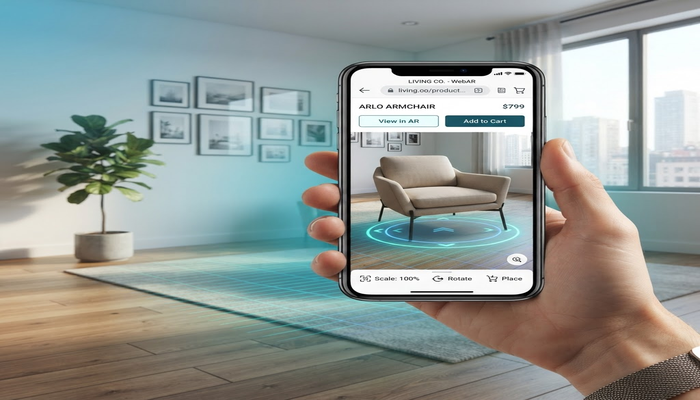
★ Quick answer: A WebAR product configurator lets shoppers customize a product in 3D and place it in their real space from a mobile browser. For US ecommerce brands in 2026, WebAR configurators help reduce returns, replace variant photography, and improve buyer confidence before checkout.
By Ink & Algorithm, Hanover Park, Illinois — see 3D web configurator services →
Why WebAR Product Configurators Matter in 2026
Most ecommerce product pages still ask buyers to imagine too much. A shopper sees a few photos, maybe a video, maybe a colour swatch, and then has to decide whether the product will look right in their home, office, showroom, or retail environment. That gap between product page and real-world fit is where abandoned carts and returns happen.
A WebAR product configurator closes that gap. The buyer can change finishes, colours, sizes, materials, and accessories in a real-time 3D viewer, then launch the same configured product into their space using the phone camera. No app download. No headset. No plugin. Just a browser-based 3D and AR experience.
For US brands selling furniture, appliances, lighting, outdoor products, fitness equipment, consumer electronics, medical devices, and industrial equipment, this is becoming a practical sales tool rather than a novelty. The value is not only visual impact. The value is that buyers understand the product faster and make fewer wrong assumptions before purchase.
What a WebAR Product Configurator Includes
| Feature | What It Does | Business Value |
|---|---|---|
| Real-time 3D viewer | Shows the product in the browser with interactive camera controls | Improves product understanding |
| Material and colour options | Lets buyers switch finishes, fabrics, trims, and surface types | Replaces large sets of variant photos |
| Size and model selection | Supports multiple SKUs, dimensions, or product families | Helps buyers compare options quickly |
| WebAR placement | Places the configured product in the buyer’s room or environment | Reduces uncertainty about scale and fit |
| Ecommerce integration | Sends selected options to Shopify, WooCommerce, Magento, or a custom checkout | Connects the experience to revenue |
Best Products for WebAR Configurators
WebAR is strongest when the buyer needs to judge size, style, proportion, or environment fit. A small commodity product may not need AR. A sofa, office chair, custom desk, refrigerator, treadmill, wall fixture, patio set, or trade show display almost certainly benefits from it.
The best candidates usually share three traits: the product has multiple variants, the product is visually important to the buyer, and the cost of a wrong purchase is high enough to create friction. If a buyer worries about whether a product will fit, match, or feel premium in context, WebAR can remove that hesitation.
How WebAR Connects to 3D Product Configuration
A basic AR viewer shows one product. A WebAR product configurator shows the exact product the buyer built. That distinction matters. If a customer selects walnut finish, black hardware, a 72-inch size, and a premium accessory package, the AR preview should show that exact combination rather than a generic sample model.
This requires a clean product logic layer. Every option must map to a 3D asset, material, or configuration rule. The viewer needs to know which combinations are valid, which choices affect price, and which selected variant should be sent to checkout or sales.
For Shopify and WooCommerce stores, this often means connecting the configurator to variant IDs, product metadata, pricing rules, and add-to-cart behavior. For B2B manufacturers, it may mean sending the configured product to a CRM, CPQ system, quote request form, or dealer portal.
Typical WebAR Product Configurator Cost in the USA
| Project Type | What It Includes | Typical US Range |
|---|---|---|
| Single-product WebAR viewer | One optimized model, AR launch, basic website embed | $8,000–$20,000 |
| WebAR configurator | Product options, materials, live 3D viewer, AR preview | $20,000–$55,000 |
| Ecommerce WebAR configurator | Shopify or WooCommerce integration, cart mapping, analytics | $35,000–$85,000 |
| Enterprise WebAR platform | Multiple products, admin controls, CRM or CPQ integration | $90,000–$200,000+ |
The biggest cost drivers are model quality, number of configurable parts, ecommerce integration depth, performance requirements, and whether the brand needs an internal admin system for updating products after launch.
3D Asset Requirements for WebAR
WebAR needs lightweight 3D assets that load quickly on mobile. Engineering CAD files usually need to be rebuilt or optimized before they can work well in a browser. The model must preserve the product’s shape and brand quality while staying small enough for real-world mobile networks.
Most projects use GLB or glTF for web viewing and USDZ or platform-specific export paths for iOS AR behavior. Materials also need careful setup. Metal, fabric, glass, plastic, wood, and painted finishes all behave differently under real lighting, so the asset pipeline matters as much as the code.
ROI: Where WebAR Pays Back
- Higher conversion: Buyers can see the exact configured product before checkout.
- Lower returns: AR helps customers understand scale, fit, colour, and placement.
- Lower photography cost: One optimized 3D system can replace hundreds of variant photos.
- Better sales conversations: Sales teams receive a clearer configuration instead of a vague inquiry.
- Reusable assets: The same 3D models can support configurators, product videos, ads, and virtual showrooms.
For US ecommerce brands, the easiest ROI case often comes from photography replacement and return reduction. For B2B companies, ROI usually comes from shorter sales cycles and fewer misunderstandings during quoting.
Implementation Timeline
A focused single-product WebAR configurator can launch in 6–10 weeks if product data and source assets are ready. A multi-product ecommerce configurator usually takes 10–18 weeks because the team needs to define variant rules, optimize many assets, integrate checkout, and test mobile performance across devices.
Enterprise deployments can take longer because pricing logic, permissions, quote workflows, and backend systems require more review. The safest approach is to start with one high-value product family, prove the workflow, and then expand the same 3D pipeline to more products.
Questions to Ask Before Building
- Which product line has the highest return rate or the most buyer hesitation?
- Do we already have CAD files, 3D files, or only product photos?
- Which options affect price, inventory, or compatibility?
- Should the configured product go to checkout, quote request, CRM, or CPQ?
- Will shoppers use this mostly on mobile, desktop, or both?
- Do we need analytics for option choices and AR launches?
Final Takeaway
A WebAR product configurator is not just a visual upgrade. It is a decision tool. It helps shoppers answer the questions that static ecommerce pages struggle with: what does this product look like in my space, which option is right for me, and can I trust this purchase?
For US brands in 2026, the strongest WebAR projects connect product visualization directly to business outcomes: fewer returns, fewer manual sales explanations, stronger conversion, and more reusable 3D content across marketing channels.
→ Talk to Ink & Algorithm about a WebAR product configurator →