
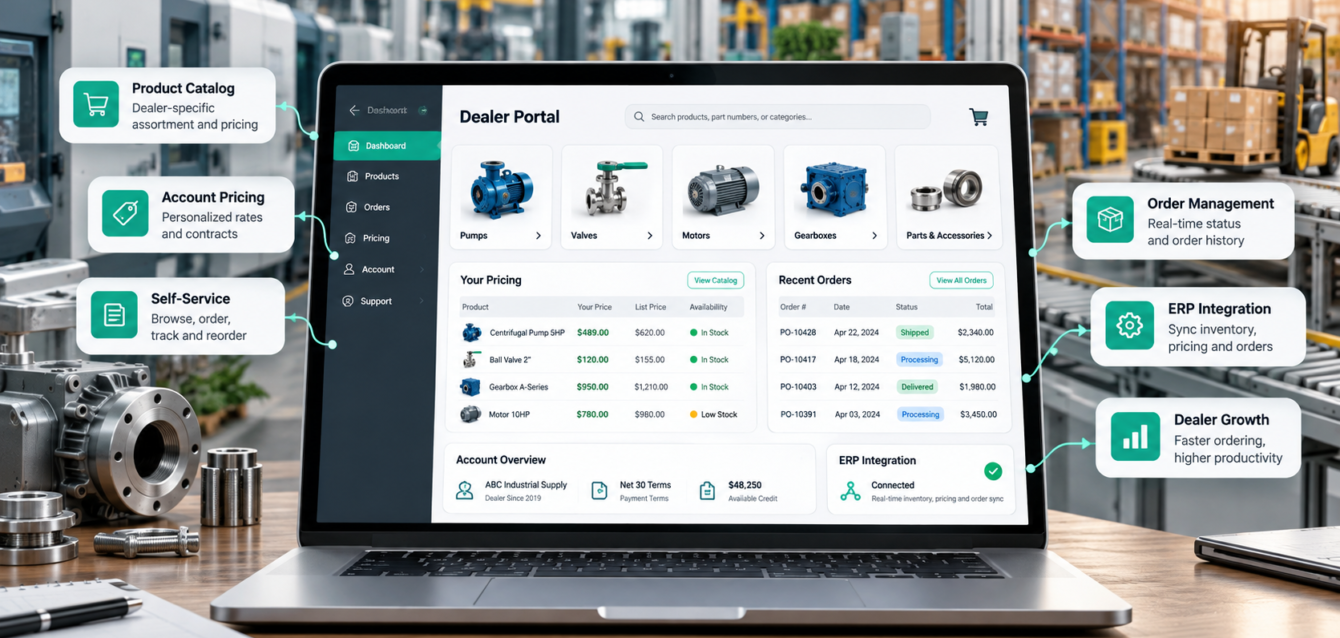
For manufacturers and distributors, dealer growth often creates a familiar operational problem: more partners, more pricing rules, more product data, and more manual order support. B2B dealer portal development brings these workflows into one secure, self-service system built around the way your channel actually sells.
A well-designed portal does more than place a catalog behind a login. It connects dealers with account-specific pricing, live product information, quotes, approvals, orders, documents, and support. When integrated with your ERP and CRM, it can reduce repetitive work while giving partners a faster and more consistent buying experience.
What Is a B2B Dealer Portal?
A B2B dealer portal is a secure web platform where authorized distributors, resellers, and sales partners can access the information and tools they need to serve customers. Unlike a standard ecommerce storefront, a portal can reflect negotiated price lists, territory rules, payment terms, product eligibility, approval chains, and organization-specific permissions.
Companies with complex channel requirements often benefit from custom B2B solutions and systems integration because the portal can follow existing commercial rules instead of forcing every dealer into a generic workflow.
Signs Your Business Needs a Dealer Portal
A portal becomes especially valuable when sales and support teams spend significant time answering availability questions, emailing price sheets, creating routine quotes, correcting order-entry errors, or locating technical documents. Other common signals include:
- Dealers see different products, pricing, or payment terms.
- Orders move between email, spreadsheets, CRM records, and ERP screens.
- Product data is duplicated across multiple systems.
- Sales approvals slow down straightforward transactions.
- Partners cannot easily track orders, warranties, or support requests.
- Growth requires more administration without increasing revenue per employee.
Essential B2B Dealer Portal Features
Account-Specific Catalogs and Pricing
Each dealer should see the right products, discounts, contract pricing, currencies, and terms after signing in. Centralized rules reduce the risk of outdated price sheets and unauthorized product access.
Self-Service Quotes, Orders, and Reorders
Dealers should be able to build a quote, save a cart, reorder from purchase history, upload a purchase order, and submit an order without waiting for manual assistance. For configurable products, a linked 3D product configurator can guide selection and prevent incompatible combinations.
Role-Based Access and Approval Workflows
Dealer owners, buyers, sales representatives, and finance users may require different permissions. Role-based controls can limit pricing visibility, set spending thresholds, and route discounts or large orders to the correct approver.
Inventory, Lead Times, and Order Tracking
Accurate inventory and fulfillment data helps partners set realistic expectations with end customers. A portal can surface stock status, estimated lead times, shipment details, invoices, and order history from connected systems.
Technical Documents and Sales Resources
Dealers need quick access to specifications, installation guides, warranties, CAD files, product imagery, and marketing materials. Searchable, version-controlled resources reduce support requests and help partners sell with confidence.
Integrations That Make the Portal Useful
The portal interface is only one part of the solution. Its value depends on reliable data exchange with the systems that already run the business.
- ERP: customer accounts, contract pricing, inventory, orders, invoices, and fulfillment status.
- CRM: dealer records, opportunities, activities, leads, and account ownership.
- PIM: product attributes, media, documents, categories, and regional content.
- Warehouse and logistics: availability, shipment tracking, and delivery estimates.
- Payments, tax, and shipping: secure checkout and accurate transaction calculations.
- CPQ: configuration rules, guided selling, quote generation, and approval logic.
If quoting complexity is the main challenge, compare custom CPQ software vs off-the-shelf CPQ before deciding whether CPQ should be embedded in the portal or connected as a separate platform.
How to Measure Dealer Portal ROI
Portal ROI should be measured against a clear operational baseline. Before launch, record the time and cost required to process routine orders, correct errors, respond to status questions, and maintain dealer-facing product information.
Useful performance indicators include:
- Percentage of dealer orders submitted through self-service.
- Reduction in manual order-entry time.
- Change in pricing and configuration error rates.
- Average quote-to-order cycle time.
- Dealer activation and repeat-order rates.
- Support tickets per order or active dealer.
- Revenue and average order value by dealer segment.
The strongest business case usually combines labor savings with revenue impact. Faster responses, fewer errors, and easier reordering can improve partner satisfaction while allowing internal teams to focus on strategic accounts.
Custom Development vs a Packaged Portal
A packaged portal can work when products, pricing, and integrations are relatively simple. Custom development becomes more attractive when workflows are a competitive advantage, legacy systems must be connected, or dealers have distinct regional and account-level requirements.
The right approach may also be hybrid: use proven commerce or identity components while building custom workflow and integration layers. Experienced enterprise web development helps ensure the portal remains fast, accessible, maintainable, and usable across desktop and mobile devices.
Security and Rollout Planning
Because dealer portals expose commercial and customer data, security must be planned from the beginning. Use strong authentication, least-privilege roles, encrypted connections, audit logs, session controls, secure APIs, and regular access reviews. Integration failures should also be monitored so dealers never act on stale pricing or inventory without a clear warning.
A phased rollout lowers risk. Start with a representative dealer group, measure task completion and support requests, refine the experience, and then expand by territory or partner tier. Training materials and an internal owner for dealer onboarding will improve adoption.
Build a Portal Around Your Dealer Workflow
The best dealer portal is not the one with the longest feature list. It is the one that removes friction from high-value tasks, keeps data consistent, and gives every partner the right information at the right time.
Ink & Algorithm designs and develops B2B portals, CPQ workflows, ecommerce systems, and integrations for complex products. Schedule a consultation to map your dealer journey, integration requirements, and measurable portal goals.