
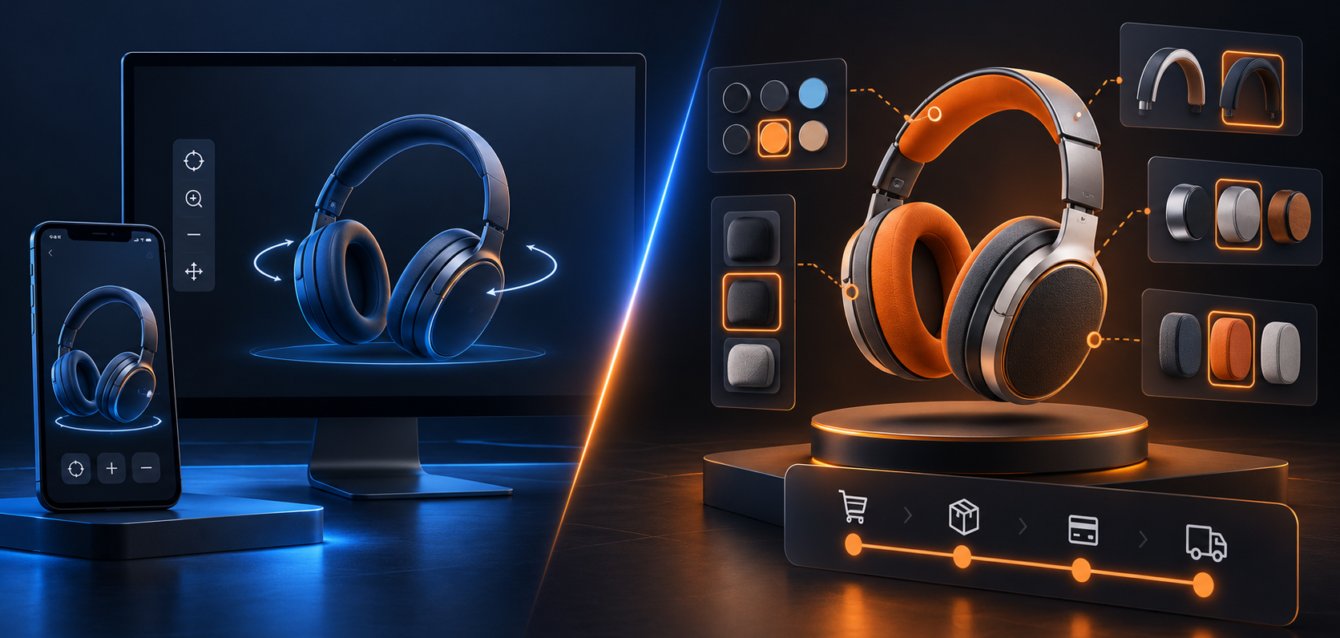
Many brands know they need a better 3D product experience, but they are not always sure whether to build a WebGL product viewer or a full 3D product configurator. Both can improve product understanding, but they solve different problems and require different levels of planning.
A product viewer helps buyers inspect a product from different angles. A configurator helps buyers change the product, compare options, follow rules, and move closer to a quote or purchase decision. Choosing the right approach early can save time, budget, and technical rework.
What Is a WebGL Product Viewer?
A WebGL product viewer is usually focused on visual inspection. It lets users rotate, zoom, pan, and explore a 3D model directly inside the browser. The product may include hotspots, annotations, exploded views, or simple material previews, but the core experience is about viewing rather than configuring.
Product viewers work well when the product has a fixed design and buyers mainly need confidence in shape, scale, details, materials, or quality. They can support ecommerce product pages, sales presentations, technical pages, and product education.
What Is a 3D Product Configurator?
A 3D product configurator lets users customize the product. That may include colors, finishes, sizes, accessories, components, bundles, layouts, pricing rules, or compatibility logic. The experience is interactive because user choices change the product and may also change the available next steps.
Configurator projects require more planning because they often connect product rules, visual assets, ecommerce systems, CRM workflows, quote forms, and analytics events. For brands selling configurable products, this extra planning can turn the experience into a stronger conversion and sales tool.
Choose a Product Viewer When the Product Is Fixed
A viewer is often the right choice when the buyer does not need to customize the product. It can still be valuable because it gives buyers more visual confidence than static images alone.
- The product has one main design or a small number of simple variants.
- Buyers need to inspect details, materials, or internal features.
- The main goal is education, trust, or product presentation.
- The site needs a lighter interactive experience with fewer business rules.
For some teams, a viewer can also be a first step before a larger configurator roadmap.
Choose a Configurator When Options Affect the Buying Journey
A configurator is usually the better fit when product options matter to the sale. If buyers need to compare finishes, select components, build valid combinations, or submit a configured quote, the experience should do more than display a model.
Teams planning this kind of experience should review product rules, asset requirements, integration needs, and analytics before production begins. Ink & Algorithm’s web-based 3D configurator development work focuses on browser-based product experiences that connect visuals with ecommerce and sales workflows.
Think About Load Speed and Asset Scope
A viewer may need one optimized 3D model, while a configurator may need many variants, texture sets, materials, and option states. That difference affects file size, loading strategy, QA, and long-term maintenance.
Both approaches should be planned for performance. A smooth experience is especially important on mobile devices, where buyers may decide quickly whether a product page feels useful or slow. Teams can use 3D asset optimization for WebGL commerce to understand how asset choices affect speed.
Consider Integrations and Data Flow
Product viewers usually have simpler integration needs. They may connect to product pages, analytics, or content management systems. Configurators often need deeper connections with Shopify Plus, Salesforce, quote workflows, product databases, SKU logic, inventory, or dealer tools.
If the experience needs to send selected options to a sales team or ecommerce checkout, a configurator architecture is usually more appropriate than a simple viewer.
Use Analytics to Decide What Comes Next
Analytics can help teams understand whether buyers are engaging with the 3D experience. For viewers, useful signals include model interactions, hotspot clicks, time on page, and product page conversion. For configurators, teams should also track option selections, completed configurations, quote requests, add-to-cart actions, and drop-off points.
The guide to 3D configurator analytics explains how enterprise teams can track buyer behavior after launch and use that data to improve the experience.
Final Takeaway
A WebGL product viewer is best when buyers need to inspect and understand a fixed product. A 3D product configurator is best when buyers need to customize, compare, submit, quote, or purchase based on selected options. The right choice depends on product complexity, buyer expectations, integrations, performance goals, and the business outcome the brand wants to support.