
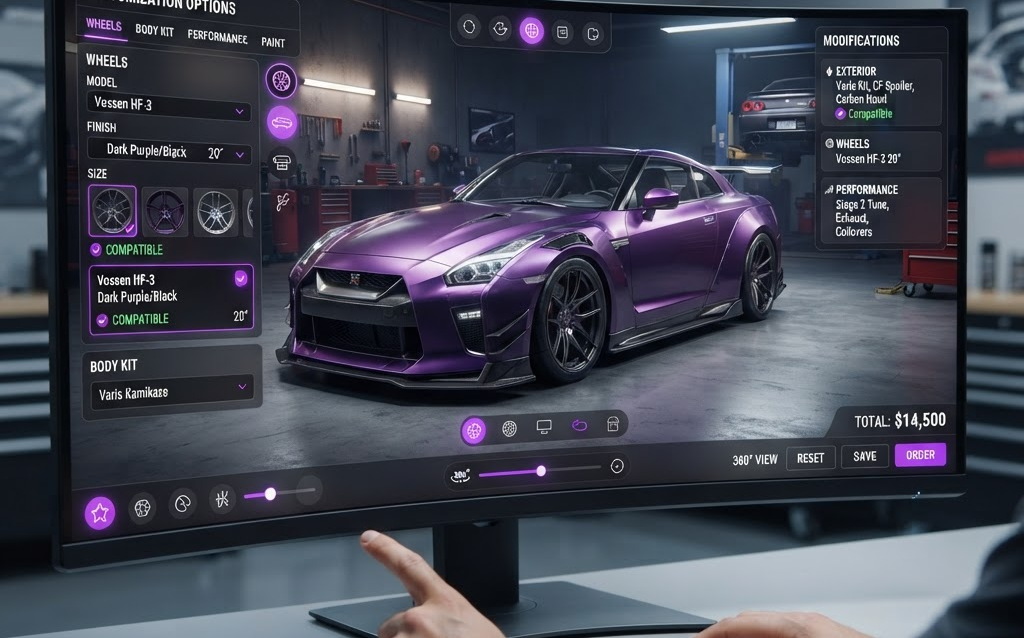
TL;DR: Automotive aftermarket configurators let car enthusiasts customize their vehicles with new wheels, body kits, exhausts, and performance parts—seeing the results in real-time 3D before buying. Parts brands using 3D configurators report 40% higher conversion, 25% larger orders, and 50% fewer fitment returns. Here’s how the aftermarket industry is using 3D visualization to sell more parts in 2026.
The automotive aftermarket is a $500 billion industry in the US alone. Enthusiasts spend thousands upgrading their vehicles—new wheels, body kits, suspension, exhausts, and performance parts. But buying aftermarket parts online has a visualization problem: will these wheels look good on my car? Does this body kit fit? Will these parts work together?
3D configurators solve this. A car owner uploads their vehicle (or selects from a database), then virtually installs parts—seeing the result in photorealistic 3D before purchasing. This visual confidence drives conversion, reduces returns, and increases order sizes.
How Automotive Aftermarket Configurators Work
Vehicle Selection
The user selects their vehicle—year, make, model, trim, and color. The configurator loads a 3D model of their specific vehicle with accurate proportions and factory paint color.
Parts Catalog
The user browses a catalog of aftermarket parts filtered for their vehicle. Only compatible parts are shown—this fitment filtering is critical because nothing kills a sale faster than a part that doesn’t fit.
Virtual Installation
The user selects a part (wheels, body kit, spoiler, exhaust tips) and it’s virtually installed on the 3D vehicle model. The result renders in real time with accurate materials—chrome wheels catch the light, carbon fiber shows its weave pattern, colored calipers glow through the spokes.
Multi-Part Configuration
The user can install multiple parts simultaneously—wheels, lowering springs, body kit, and spoiler—building a complete custom build. Each addition updates the 3D model and the total price in real time.
Build Sharing
Completed builds can be saved, shared via link, and posted to social media. This sharing drives organic traffic—enthusiasts share their builds on forums, Instagram, and Reddit, generating free marketing for the parts brand.
Why Aftermarket Parts Brands Need 3D Configurators
40% Higher Conversion
Enthusiasts who see parts on their actual vehicle model in 3D are 40% more likely to purchase. The “will it look good?” question is answered before they buy—eliminating the hesitation that prevents online parts purchases.
25% Larger Orders
When a user is configuring a build, they tend to add more parts. A customer who came for wheels sees how a lowering kit improves the stance—adding it to the cart. A customer adding a body kit sees how a spoiler completes the look. The configurator upsells naturally by showing how parts complement each other.
50% Fewer Fitment Returns
The #1 reason for aftermarket parts returns is fitment issues—wrong size, incompatible with other modifications, or doesn’t fit the specific trim. A configurator that filters parts by exact vehicle fitment eliminates these returns. Only compatible parts are shown, and the user confirms their vehicle details before purchasing.
Community Building
Car enthusiasts love sharing their builds. A configurator that lets users save and share their custom builds creates a community of brand advocates. Each shared build is free marketing, driving new customers to the configurator.
The Technology: Building Aftermarket Configurators
3D Vehicle Models
The configurator needs accurate 3D models for every supported vehicle. These can be sourced from:
- OEM CAD data — licensed from manufacturers (most accurate, most expensive)
- 3D scanning — scan real vehicles with photogrammetry or structured light
- Vehicle model databases — licensed from 3D model libraries (faster, less accurate)
Target 50K–200K polygons per vehicle with accurate exterior dimensions and proportions.
Part Modeling
Each aftermarket part needs a 3D model that fits the vehicle model. Wheels are the most common—each wheel design is a separate 3D model that replaces the factory wheels on the vehicle. Body kits, spoilers, and exhaust tips are modeled as add-on geometry.
Rendering Engine
- Three.js — sufficient for most wheel and exterior configurators. Good quality, no per-session cost.
- Unreal Engine 5 + Pixel Streaming — for premium quality with ray-traced reflections on chrome wheels and paint. Higher cost but film-grade quality.
- Unity WebGL — middle ground, cross-platform with good quality.
Fitment Database
The configurator needs a fitment database that maps each part to compatible vehicles. This data typically comes from the manufacturer’s fitment guide or aftermarket databases like FitmentData or RevZilla’s Fitment API. The database ensures users only see parts that fit their specific vehicle.
Cost of an Aftermarket Parts Configurator
| Scope | Cost | Timeline |
|---|---|---|
| Single category (wheels only) | $20,000–$60,000 | 5–10 weeks |
| Multi-category (wheels + body + exhaust) | $50,000–$150,000 | 8–16 weeks |
| Full platform (all categories + fitment DB + sharing) | $100,000–$400,000+ | 12–24 weeks |
| 3D vehicle model per vehicle | $2,000–$10,000 | 5–14 days |
| 3D part model per part | $200–$1,000 | 2–5 days |
FAQ: Automotive Aftermarket Configurators
How much does an aftermarket parts configurator cost?
A single-category configurator (wheels only) costs $20,000–$60,000. A multi-category platform covering wheels, body kits, and exhaust costs $50,000–$150,000. A full platform with fitment database, build sharing, and e-commerce integration costs $100,000–$400,000+. 3D vehicle models cost $2,000–$10,000 each, and 3D part models cost $200–$1,000 each.
Do I need a 3D model for every supported vehicle?
For maximum accuracy, yes—each vehicle needs its own 3D model. However, you can group similar vehicles (e.g., all 2020-2024 Toyota Camry trims share one model with different paint options). Starting with the top 20 most popular vehicles covers 60–70% of your customer base.
Can the configurator filter parts by fitment?
Yes. The configurator connects to a fitment database that maps each part to compatible vehicle years, makes, and models. When a user selects their vehicle, only compatible parts are shown. This eliminates fitment-related returns, which are the #1 return reason for aftermarket parts.
Can users share their custom builds?
Yes. The configurator generates a unique URL for each saved build. Users share this link on forums, social media, and with friends. Each shared build includes a 3D view of the customized vehicle and a parts list with pricing—turning customer builds into marketing content that drives new visitors to the configurator.
Can the configurator integrate with my e-commerce store?
Yes. The configurator connects to your e-commerce platform (Shopify, WooCommerce, Magento, custom) via API. When a user completes a build, all selected parts are added to the cart with the correct fitment information. The user checks out through your existing system.
Getting Started
- Start with wheels — the highest-volume aftermarket category and easiest to visualize in 3D
- Support your top 20 vehicles — covers the majority of your customer base
- Use Three.js — sufficient quality for wheels and exterior parts, no per-session cost
- Add build sharing — let enthusiasts share their builds for free marketing
- Integrate fitment data — only show compatible parts to eliminate returns
The automotive aftermarket is driven by passion. Enthusiasts don’t just buy parts—they build dreams. A 3D configurator lets them see those dreams before they spend a dollar, turning hesitation into excitement and browsers into buyers.
Ready to build an aftermarket parts configurator? Contact Ink & Algorithm to discuss your project—we’ll help you create a 3D configurator that drives parts sales and builds community.