
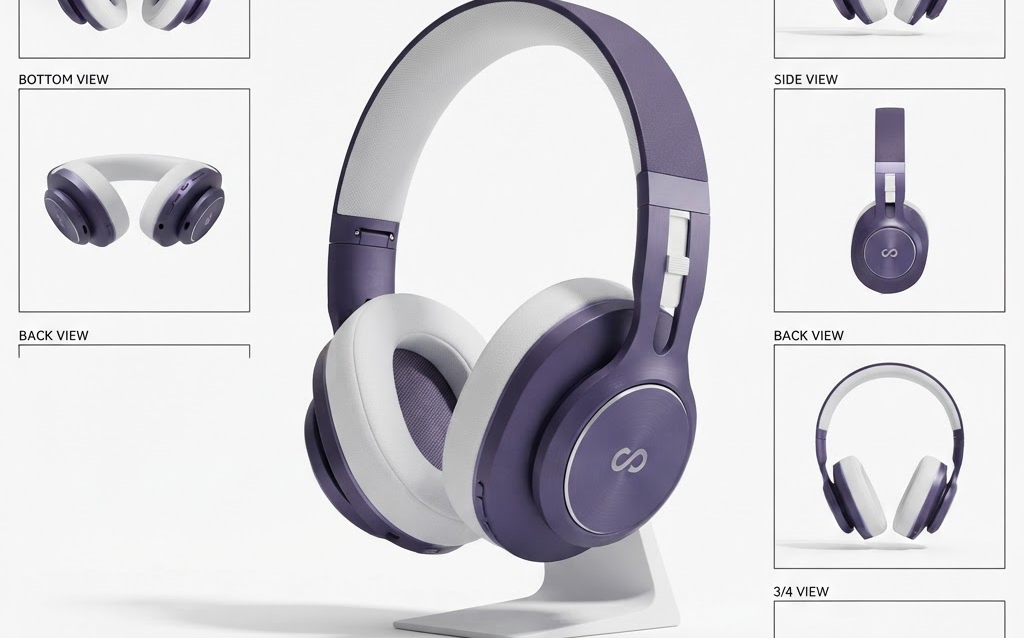
TL;DR: 3D rendering lets Amazon sellers create unlimited product images, lifestyle shots, and infographic visuals from a single 3D model—no photo studio, no reshoots. Brands using CGI product images on Amazon report 25% higher conversion, 60% lower image production costs at scale, and consistent visual quality across their entire catalog. Here’s how to use 3D rendering for Amazon listings in 2026.
Amazon product images are the single most important factor in conversion. A shopper scrolling through search results decides in 1–2 seconds whether to click, and that decision is based almost entirely on the main product image. Yet most Amazon sellers still rely on traditional photography—expensive, time-consuming, and limited in the angles and variants they can afford to shoot.
3D rendering changes this. One 3D model generates unlimited images—white background shots, lifestyle scenes, infographic overlays, exploded views, and 360° spins—all from the same digital asset. No studio. No photographer. No reshoots.
Why 3D Rendering Works for Amazon
Amazon’s Image Requirements Are Perfect for CGI
Amazon requires pure white backgrounds (RGB 255, 255, 255) for main images. Achieving perfect white in photography requires studio lighting and post-processing. In 3D rendering, pure white is a single background setting. No lighting adjustments, no color correction, no white balance issues.
Unlimited Angles and Variants
Amazon allows up to 7 images per listing (plus video). Most sellers use: main product shot, alternate angle, lifestyle shot, feature infographic, size comparison, packaging shot, and comparison chart. With photography, each of these requires a separate shoot setup. With 3D rendering, they’re all generated from one model—just change the camera angle, swap the background, or add text overlays.
Perfect Consistency Across Catalog
For brands with 50+ products, maintaining visual consistency across all listings is a challenge with photography—different shoots produce different lighting, angles, and quality. 3D rendering ensures every product in your catalog has the same lighting, angle style, and visual quality, creating a professional, cohesive brand presence on Amazon.
Product Variants Without Reshoots
If your product comes in 5 colors, photographing each variant requires 5 separate shoots. With 3D rendering, you change the material color in the software and render—each variant takes minutes, not days. This means every color variant can have a full set of images, not just the main product.
Types of Amazon Images You Can Create with 3D Rendering
Main Product Image (White Background)
The hero image that appears in search results. Must be on pure white background, product filling 85% of frame. 3D rendering produces these perfectly every time—no studio needed, no white balance issues, no shadows to clean up.
Lifestyle Images
The product in a realistic environment—on a kitchen counter, in a bathroom, on a desk. With 3D rendering, you build the environment in 3D and place the product model inside it. Change the environment instantly without booking a new shoot location.
Infographic / Feature Callout Images
Product image with text overlays, arrows, and callout boxes highlighting features. These are the highest-converting secondary images on Amazon. 3D rendering lets you position the product perfectly and add annotations in post-production.
Size Comparison Images
Product shown next to common objects (a coin, a hand, a smartphone) for scale reference. 3D rendering lets you place any reference object next to the product with perfect proportions—no need to physically obtain reference items.
Exploded View / Cutaway
Show the product’s internal components and build quality. Impossible with traditional photography (you can’t photograph inside a sealed product). 3D rendering creates cutaway views that show layers, components, and construction quality—building trust with technical buyers.
360° Product Spin
Amazon supports 360° product spins. With 3D rendering, you render 36 frames (one per 10° rotation) from the model—no specialized turntable photography equipment needed.
Cost Comparison: 3D Rendering vs Traditional Photography for Amazon
| Image Need | 3D Rendering | Traditional Photography |
|---|---|---|
| Initial model creation | $300–$1,500 (one-time) | $0 (no model needed) |
| Main product image | $50–$100 (render) | $50–$200 (shoot + retouch) |
| Each additional angle | $20–$50 (render) | $50–$200 (reshoot) |
| Lifestyle image | $100–$300 (3D scene) | $200–$500 (location shoot) |
| Color variant (full set) | $50–$100 (material swap) | $300–$1,400 (full reshoot) |
| 7-image set (1 product) | $500–$2,000 total | $700–$2,500 total |
| 50-product catalog | $15,000–$60,000 | $35,000–$125,000 |
The cost advantage of 3D rendering compounds with scale. For a single product, the savings are modest. For a 50-product catalog with color variants, 3D rendering saves 50–60% compared to traditional photography.
Best Practices for 3D-Rendered Amazon Images
Match Amazon’s Technical Requirements
- Minimum 1000×1000 pixels (1600×1600 recommended for zoom)
- Pure white background (RGB 255, 255, 255) for main image
- Product fills 85% of the frame for main image
- No watermarks, logos, or text on main image
- JPEG, TIFF, PNG, or GIF format
Make It Photorealistic
Amazon shoppers should not be able to tell the difference between a 3D render and a photograph. Invest in quality rendering with accurate lighting, realistic materials, and proper post-processing. A bad 3D render is worse than an average photo—make sure quality is indistinguishable.
Use the Full 7 Images
Amazon allows 7 images—use all of them. The images that drive the most conversion are: main product shot, 2 alternate angles, 1 lifestyle image, 1 feature infographic, 1 size comparison, and 1 packaging/instruction image. 3D rendering makes producing all 7 cost-effective.
A/B Test Your Main Image
The main image determines click-through rate from search results. With 3D rendering, you can produce multiple versions of the main image (different angles, lighting, product orientation) and A/B test them. Photography makes A/B testing expensive; 3D rendering makes it free.
FAQ: 3D Rendering for Amazon Sellers
Does Amazon accept 3D-rendered product images?
Yes. Amazon accepts CGI product images as long as they accurately represent the actual product. Many top-selling Amazon brands use 3D renders for their product images. The key requirement is that the rendered image must match the physical product—no misleading representations.
How much does 3D rendering cost per Amazon product?
A 3D model costs $300–$1,500 (one-time per product). A full 7-image set from that model costs $500–$2,000 total. For a 50-product catalog, total costs range from $15,000–$60,000—50–60% cheaper than traditional photography at scale. Each color variant costs $50–$100 (material swap) vs $300–$1,400 (full reshoot).
Can I create Amazon infographic images with 3D rendering?
Yes. 3D rendering gives you full control over product positioning, camera angle, and background, making it ideal for creating infographic-style images with text overlays, arrows, and callout boxes. The product is rendered first, then text and graphics are added in post-production (Photoshop, Figma, or similar).
How long does it take to create 3D renders for an Amazon listing?
Once the 3D model exists (3–7 days to create), rendering a full 7-image set takes 1–3 days. This is faster than scheduling a photo shoot, setting up studio lighting, shooting, and retouching—which typically takes 1–2 weeks per product.
Is 3D rendering better than photography for Amazon?
For most Amazon sellers with multiple products and variants, 3D rendering is better—lower cost at scale, perfect white backgrounds, unlimited angles, instant color variants, and consistent visual quality. For single products or products with complex physical textures (food, fabric), photography may still be preferable. Many brands use a hybrid: 3D for product images, photography for lifestyle shots.
Getting Started
- Start with your best-selling product — create a 3D model and full 7-image set
- Compare conversion rates — A/B test 3D-rendered images vs current photos
- Scale to your full catalog — the cost advantage compounds with volume
- Add color variants — create image sets for every color at a fraction of photography costs
- Request 360° spins — Amazon supports these and they increase conversion by 15–27%
Amazon sellers who invest in 3D rendering gain a visual advantage that’s hard to replicate with photography: perfect consistency, unlimited variations, and cost-effective scaling. In a marketplace where image quality directly determines sales, CGI is becoming the standard, not the exception.
Ready to create 3D-rendered product images for Amazon? Contact Ink & Algorithm to discuss your project—we’ll help you build a 3D image library that makes your Amazon listings stand out.