
TL;DR: 3D product animation helps hardware startups raise 40–60% more on Kickstarter by showing working product prototypes before manufacturing begins. A compelling 3D animation in a Kickstarter video increases pledge rates by 35% and helps campaigns reach funding goals 2x faster. Here’s how to create visual content that converts backers in 2026.
Kickstarter is a visual platform. Backers can’t touch, hold, or test the product—they make their pledge decision based on what they see in the campaign video and product images. For hardware startups that haven’t started manufacturing yet, 3D product animation is how you show a product that doesn’t physically exist yet.
The most successful Kickstarter hardware campaigns in 2026 use 3D animation to show working prototypes, demonstrate features, and create the emotional connection that drives pledges. This guide covers how to use 3D animation for crowdfunding success.
Why 3D Animation Works for Kickstarter
Show the Product Before It Exists
Hardware startups often launch Kickstarter campaigns before manufacturing begins. They have CAD files, prototypes, and design specs—but no finished product to film. 3D animation bridges this gap by rendering the final product from CAD data—showing it working, moving, and functioning as if it were real.
Demonstrate Features That Can’t Be Filmed
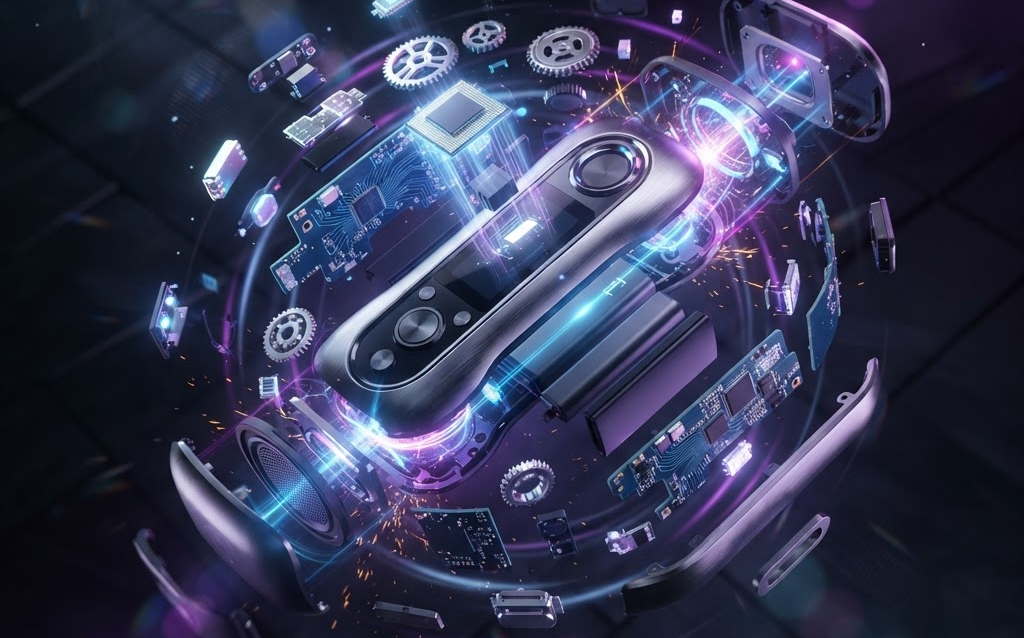
Some product features are impossible to film: internal mechanisms, hidden components, how electronics work inside the housing. 3D animation’s exploded view and cutaway capabilities show internal workings that no camera can capture.
Emotional Connection Through Storytelling
A product animation isn’t just a technical demo—it’s a story. A smart lock that rotates open as the user approaches. A drone that unfolds and takes off. A watch that assembles itself component by component. These visual narratives create the “I want that” moment that drives pledges.
Higher Production Value Than Live Video
For startups with limited budgets, 3D animation can actually look more premium than live video. No need for expensive camera equipment, studio rentals, or reshoots. The animation is controlled frame by frame—every lighting setup, camera angle, and motion is deliberate and polished.
Types of 3D Animation for Kickstarter
Hero Animation (30–60 seconds)
The centerpiece of the campaign video. Shows the product in its best light—rotating, assembling, or performing its key function. This is the shot that appears in thumbnails, social media teasers, and press coverage.
Feature Demonstration (15–30 seconds each)
Short animations showing individual features: how the product opens, charges, connects, or transforms. These are used throughout the campaign page and in update videos.
Exploded View (10–20 seconds)
The product disassembles into components, showing internal engineering and build quality. This builds trust—backers see the quality of components, the thought in the design, and the manufacturing approach.
Use Case Scenarios (20–40 seconds each)
The product shown in real-world environments—a 3D model of the product in a rendered kitchen, office, or outdoor scene. These help backers imagine the product in their own life.
Comparison Animation (15–30 seconds)
Side-by-side comparison with existing solutions. Shows why the new product is better, faster, or more innovative than what’s currently on the market.
Cost of 3D Animation for Kickstarter
| Animation Type | Cost | Timeline |
|---|---|---|
| Hero animation (30s) | $5,000–$20,000 | 2–4 weeks |
| Feature demos (3–5 clips) | $3,000–$15,000 | 1–3 weeks |
| Exploded view | $2,000–$8,000 | 1–2 weeks |
| Full campaign video (2–3 min) | $15,000–$50,000 | 4–8 weeks |
| Full campaign package (video + images + GIFs) | $20,000–$70,000 | 5–10 weeks |
What Makes a Kickstarter 3D Animation Successful?
Show the Product Working
Backers don’t just want to see the product—they want to see it working. A drone should fly. A lock should open. A speaker should pulse with music. The animation must demonstrate function, not just form. Static beauty shots don’t drive pledges—working products do.
Keep It Under 3 Minutes
Kickstarter campaign videos that exceed 3 minutes see significant drop-off. The ideal length is 90–120 seconds. Lead with the hero animation in the first 10 seconds—this is where most backers decide whether to keep watching.
Show the Problem and Solution
The animation should clearly show the problem the product solves. Before: the frustrating current experience. After: how the new product makes it effortless. This before/after contrast is the most persuasive structure for crowdfunding.
Include a CTA
The animation should end with a clear call to action: “Back this project” or “Pledge now.” The final frame should show the product, the campaign name, and the funding goal.
ROI: How 3D Animation Affects Kickstarter Funding
- 40–60% higher funding — campaigns with professional 3D animation raise more than those with amateur video or static images
- 35% higher pledge rate — backers who watch animated product demos pledge more often
- 2x faster funding — compelling visual content helps campaigns reach their goal in days instead of weeks
- Better press coverage — journalists and influencers share visually striking animations
- Reusable for manufacturing — the 3D models created for the campaign can be used for production, marketing, and post-campaign sales
FAQ: 3D Animation for Kickstarter
How much does a Kickstarter 3D animation cost?
A 30-second hero animation costs $5,000–$20,000. A full campaign video (2–3 minutes) with multiple animations costs $15,000–$50,000. A complete campaign package including video, product images, and social media GIFs costs $20,000–$70,000. The 3D model created can be reused for post-campaign marketing and e-commerce.
Can I use 3D animation if I only have CAD files?
Yes—CAD files (STEP, IGES, SolidWorks) are actually the ideal starting point for 3D animation. The animation studio converts CAD geometry to 3D models suitable for rendering, applies materials and textures, and animates the product. This means you can show a photorealistic, working product before manufacturing even begins.
How long before launch should I start the animation?
Start 6–8 weeks before your Kickstarter launch. This gives the animation studio time to create the 3D model, develop the animation, render, and iterate based on your feedback. Rushing the animation results in lower quality—and on Kickstarter, visual quality directly impacts funding.
Should the animation replace live video entirely?
Not entirely. The most successful campaigns combine 3D animation with brief live video of the founders and the physical prototype. Use 3D animation for product demos and feature showcases, and live video for the team, the story, and the behind-the-scenes content. This combination builds both product confidence and personal trust.
Can I reuse the 3D assets after the campaign?
Absolutely. The 3D models created for the Kickstarter campaign become your brand’s visual asset library. After the campaign, use them for e-commerce product pages, social media content, AR experiences, and future marketing campaigns. The animation investment pays dividends far beyond the Kickstarter campaign.
Getting Started
If you’re planning a Kickstarter launch, the visual content is the single most important investment after the product itself. Backers pledge based on what they see—make sure what they see is extraordinary.
Ready to create 3D animation for your Kickstarter campaign? Contact Ink & Algorithm to discuss your project—we’ll help you create visual content that drives pledges and reaches your funding goal.