
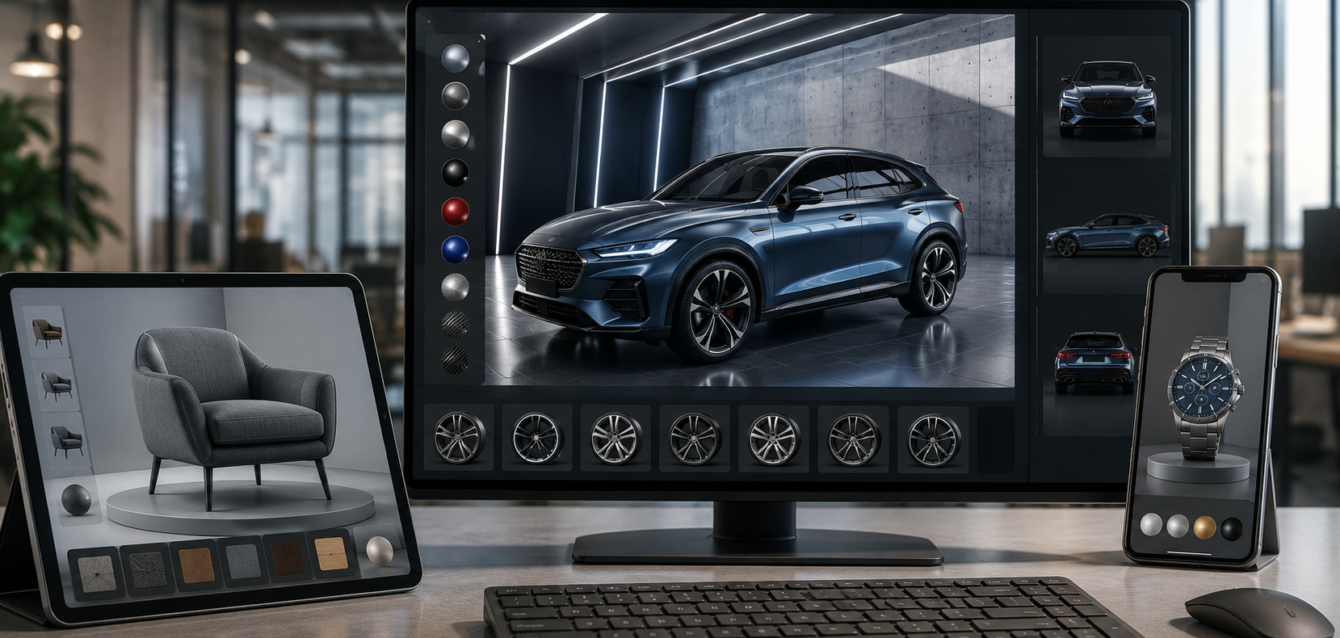
TL;DR: Unreal Engine 5 is the gold standard for photorealistic 3D product configurators. With Nanite virtualized geometry, Lumen global illumination, and real-time ray tracing, brands can deliver film-quality interactive experiences that run at 60fps on everything from high-end PCs to web browsers via Pixel Streaming. Development costs range from $40,000 for a single-product configurator to $250,000+ for a full multi-product platform. Here’s what you need to know to build one in 2026.
When brands need the absolute highest visual quality in a 3D configurator—photorealistic materials, real-time reflections, cinematic lighting—they turn to Unreal Engine 5. While web-based engines like Three.js handle 80% of configurator needs at lower cost, Unreal Engine occupies the premium tier where visual fidelity is the product’s competitive advantage.
Automotive showrooms, luxury furniture, jewelry, architecture, and aerospace—these are the categories where Unreal Engine configurators shine. A car buyer configuring paint color and wheels in real time with ray-traced reflections isn’t just customizing a product; they’re experiencing the brand at its most premium. This guide covers how Unreal Engine configurators work, what they cost, and when they’re worth the investment.
Why Unreal Engine 5 for Product Configurators?
Nanite Virtualized Geometry
Traditional 3D engines choke on high-polygon models—a single car interior can have millions of polygons, bringing most renderers to a crawl. Unreal Engine 5’s Nanite system virtualizes geometry, meaning it only renders the polygons visible to the camera at any given moment. This allows configurators to use film-quality assets with billions of polygons without performance loss.
For product configurators, this means no more aggressive polygon reduction. The same 3D model used for a cinematic commercial can be dropped directly into the configurator. A watch configurator can show microscopic engraving details; a car configurator can display accurate stitch patterns on leather seats.
Lumen Global Illumination
Lumen is Unreal Engine 5’s real-time global illumination system. Instead of pre-baking lighting (which breaks when materials change), Lumen calculates light bouncing off surfaces in real time. When a customer swaps a product’s material from matte black to glossy chrome, the entire scene’s lighting updates instantly—reflections, shadows, color bleed, ambient occlusion.
This is the feature that makes Unreal configurators feel fundamentally different from web-based alternatives. In a Three.js configurator, a material swap changes the texture but the lighting stays static. In Unreal, the room itself responds to the product’s new material—the chrome reflects the environment, the matte absorbs it. It’s the difference between “looks like a render” and “looks real.”
Real-Time Ray Tracing
On hardware that supports it (RTX GPUs, modern consoles), Unreal Engine 5 can enable hardware-accelerated ray tracing for reflections, refractions, shadows, and global illumination. For product configurators, this means:
- Accurate reflections — a polished car body reflects the showroom environment correctly, not a fake environment map
- Refraction — glass, crystal, and transparent materials bend light accurately
- Contact shadows — objects cast realistic soft shadows where they meet surfaces
- Caustics — light focused through glass or water creates realistic light patterns
For jewelry and automotive configurators, ray tracing is the difference between a convincing image and an obviously fake one.
How Unreal Engine Configurators Work: The Architecture
The Unreal Engine Frontend
The configurator itself is built inside Unreal Engine 5 using Blueprints (Unreal’s visual scripting system) or C++. The 3D product model, materials, lighting environment, and camera system are all set up within the engine. The customer interacts with the configurator through a game-like interface—clicking material swatches, dragging rotation, zooming with scroll.
Key components in the Unreal project:
- Material instances — each swappable material is a parameterized material instance, allowing real-time changes to color, roughness, metalness, and texture
- Variant manager — Unreal’s built-in system for managing product variants (different trims, colors, packages) and switching between them
- Camera rig — a scripted camera system that orbits, zooms, and focuses on user-selected areas
- UI overlay — UMG (Unreal Motion Graphics) widgets for the material picker, pricing display, and save/share buttons
- Animation sequences — exploded views, assembly animations, and product tours triggered by user interaction
The Backend: Configuration Data and Pricing
Behind the Unreal frontend, a backend server manages product data, pricing rules, and saved configurations. This is typically a REST API built in Node.js, Python, or C# that communicates with Unreal Engine via HTTP requests or WebSocket connections.
The backend handles:
- Product catalog and available options per model
- Pricing calculations based on selected configuration
- Inventory and availability checks
- Saved configurations (stored as JSON with product ID + selected options)
- E-commerce platform integration (Shopify, custom CMS, CRM)
Delivery: How Customers Access the Configurator
This is the critical architectural decision. Unreal Engine configurators can be delivered three ways:
1. Desktop Application (Windows/Mac)
The configurator is packaged as a standalone executable that customers download and run on their computer. This delivers maximum performance—full ray tracing, 4K resolution, no network latency—but requires a powerful GPU and a download step. Best for B2B sales tools, trade show kiosks, and dealership displays.
2. Pixel Streaming (Browser Delivery)
Pixel Streaming is Unreal Engine’s cloud rendering solution. The configurator runs on a powerful cloud server with an RTX GPU, and the output is streamed to the customer’s browser as video. The customer’s device only needs to display video and send input commands—no GPU required on the client side.
This is how brands deliver Unreal-quality configurators through a web browser. The customer opens a link, sees a photorealistic real-time configurator, and interacts with it as if it were running locally. The trade-off is streaming cost (GPU servers run $0.50–$3/hour) and latency (20–100ms depending on location).
3. Mobile App (iOS/Android)
Unreal Engine can package configurators as mobile apps, taking advantage of mobile GPU ray tracing (on supported devices like iPhone 15 Pro and Snapdragon Elite devices). This gives brands a native app experience with near-desktop quality. The limitation is app download friction and device compatibility.
Unreal Engine vs Three.js: When to Choose Which
| Factor | Unreal Engine 5 | Three.js (Web) |
|---|---|---|
| Visual Quality | Film-grade (Nanite + Lumen) | Good (WebGL-based) |
| Real-Time Lighting | Full global illumination | Static/baked lighting |
| Ray Tracing | Hardware-accelerated | Limited (fragment shaders) |
| Polygon Budget | Billions (Nanite) | ~1–5M (mobile limit) |
| Delivery | Desktop, Pixel Streaming, Mobile | Any browser |
| Development Cost | $40K–$250K+ | $20K–$100K |
| Loading Time | 10–60s (large assets) | 2–5s (optimized) |
| Streaming Cost | $0.50–$3/hour (Pixel Streaming) | $0 (client-side rendering) |
| Best For | Premium brands, automotive, luxury | Ecommerce, retail, mid-market |
The decision framework is simple: if your product costs under $500 and you need broad reach, use Three.js. If your product costs over $5,000 and visual fidelity is a competitive advantage, Unreal Engine is worth the investment.
Real-World Examples: Brands Using Unreal Engine Configurators
Automotive
Major automotive brands including Audi, Porsche, and Mercedes-Benz use Unreal Engine for their online car configurators. Real-time ray tracing shows paint colors with accurate environment reflections, interior materials with correct light response, and wheel designs spinning in photorealistic showrooms. Some brands deploy via Pixel Streaming so customers configure cars in a browser without downloading anything.
Furniture and Interior Design
Premium furniture brands use Unreal Engine configurators to show products in photorealistic room environments. Customers swap upholstery, wood finishes, and metal hardware while Lumen updates the room’s lighting in real time. The configurator can also export the configured product to AR for placement in the customer’s actual room.
Architecture and Real Estate
Real estate developers use Unreal Engine for interactive apartment configurators where buyers customize finishes, flooring, kitchen layouts, and view options. The real-time lighting shows how natural light changes throughout the day, helping buyers understand how their apartment will feel at different hours.
Jewelry and Watches
Luxury brands use Unreal Engine to showcase jewelry with accurate gemstone refraction, metal reflections, and micro-details. Nanite allows zooming to microscopic levels to show engraving and setting details that no web engine can match.
Development Cost Breakdown
| Component | Cost Range |
|---|---|
| 3D Modeling (hero product, high-detail) | $2,000–$10,000 |
| Unreal Engine project setup | $5,000–$15,000 |
| Material system (parameterized instances) | $5,000–$15,000 |
| Variant manager & configuration logic | $8,000–$25,000 |
| UI/UX (UMG widgets, material picker) | $5,000–$20,000 |
| Backend API & pricing engine | $5,000–$15,000 |
| Pixel Streaming setup (if browser delivery) | $5,000–$15,000 |
| E-commerce integration | $3,000–$10,000 |
| Testing & optimization | $5,000–$15,000 |
| Total (single product, desktop) | $40,000–$125,000 |
| Total (single product, Pixel Streaming) | $55,000–$160,000 |
| Total (multi-product platform) | $100,000–$250,000+ |
Ongoing costs: Pixel Streaming server hosting ($0.50–$3/hour per concurrent user), 3D modeling for new products ($2,000–$10,000 each), and maintenance (15–20% of build cost annually).
Pixel Streaming: Delivering Unreal Quality in a Browser
Pixel Streaming is the technology that makes Unreal Engine configurators viable for consumer-facing web deployment. Here’s how it works:
- The Unreal Engine configurator runs on a cloud server with an RTX GPU (AWS, Azure, or specialized providers like PureWeb)
- The server renders each frame and streams it as video to the customer’s browser via WebRTC
- The customer’s browser displays the video stream and sends input (mouse, touch) back to the server
- The server processes the input, updates the 3D scene, and streams the next frame
The customer experiences a full Unreal Engine configurator in their browser—photorealistic quality, real-time ray tracing, zero download—on any device, including tablets and low-end laptops.
The trade-off is latency and cost. At 30–60fps with 50–100ms latency, the experience feels near-local. Cost scales with concurrent users—each active session consumes a GPU server. Brands typically budget $0.50–$3 per user session for cloud rendering.
FAQ: Unreal Engine Product Configurators
Can Unreal Engine configurators run in a web browser?
Yes, through Pixel Streaming. The Unreal Engine configurator runs on a cloud GPU server and streams real-time video to the customer’s browser via WebRTC. The customer gets full Unreal-quality visuals—ray tracing, Lumen lighting, Nanite geometry—on any device with a browser, no download or powerful GPU required on their end. The trade-off is streaming cost ($0.50–$3/hour per concurrent user) and 30–100ms latency.
How much does an Unreal Engine configurator cost?
A single-product desktop configurator costs $40,000–$125,000. Adding Pixel Streaming for browser delivery adds $15,000–$35,000 in setup plus ongoing server costs. A full multi-product platform with e-commerce integration and content management runs $100,000–$250,000+. 3D modeling for each additional product costs $2,000–$10,000 depending on detail level.
When should I choose Unreal Engine over Three.js?
Choose Unreal Engine when your product is premium (over $5,000), visual fidelity is a core brand differentiator, and you need features like real-time global illumination, hardware ray tracing, or billion-polygon models. Choose Three.js for broader reach, faster loading, lower cost, and when web-native performance matters more than absolute visual quality. Many brands start with Three.js and upgrade to Unreal as their configurator needs evolve.
Do customers need a powerful computer to use an Unreal configurator?
Only for desktop-delivered configurators. If you use Pixel Streaming, the customer’s device only needs a browser and an internet connection—the heavy rendering happens on the cloud server. For mobile apps, the configurator can scale quality based on device capability—full ray tracing on iPhone 15 Pro, simplified rendering on older devices.
Can Unreal Engine configurators integrate with Shopify or other e-commerce platforms?
Yes. The backend API that powers the configurator can communicate with Shopify, WooCommerce, Salesforce Commerce Cloud, or any platform with a REST API. The configurator sends the selected configuration to the backend, which creates a product variant in the e-commerce platform and passes it to the cart. For fully custom products, the backend generates a dynamic product entry on the fly.
Is an Unreal Engine Configurator Right for Your Brand?
Unreal Engine configurators represent the premium tier of 3D product visualization. They deliver visual quality that no web engine can match—film-grade materials, real-time global illumination, and ray-traced reflections that make virtual products indistinguishable from physical ones.
But that quality comes at a cost: higher development budgets, longer timelines, and (for browser delivery) ongoing streaming expenses. The brands that see ROI from Unreal configurators are those where the product’s visual appeal is the primary sales driver—automotive, luxury goods, architecture, and high-end furniture.
For most ecommerce brands, a phased approach works best: start with a Three.js web configurator to validate the market and measure conversion lift, then upgrade to Unreal Engine once the ROI justifies the investment. The 3D assets you create for the web version can be enhanced and reused in the Unreal version, making the upgrade path efficient.
Ready to explore an Unreal Engine configurator for your brand? Contact Ink & Algorithm to discuss your project—we’ll help you architect a real-time 3D configurator that matches your brand’s quality and budget.