
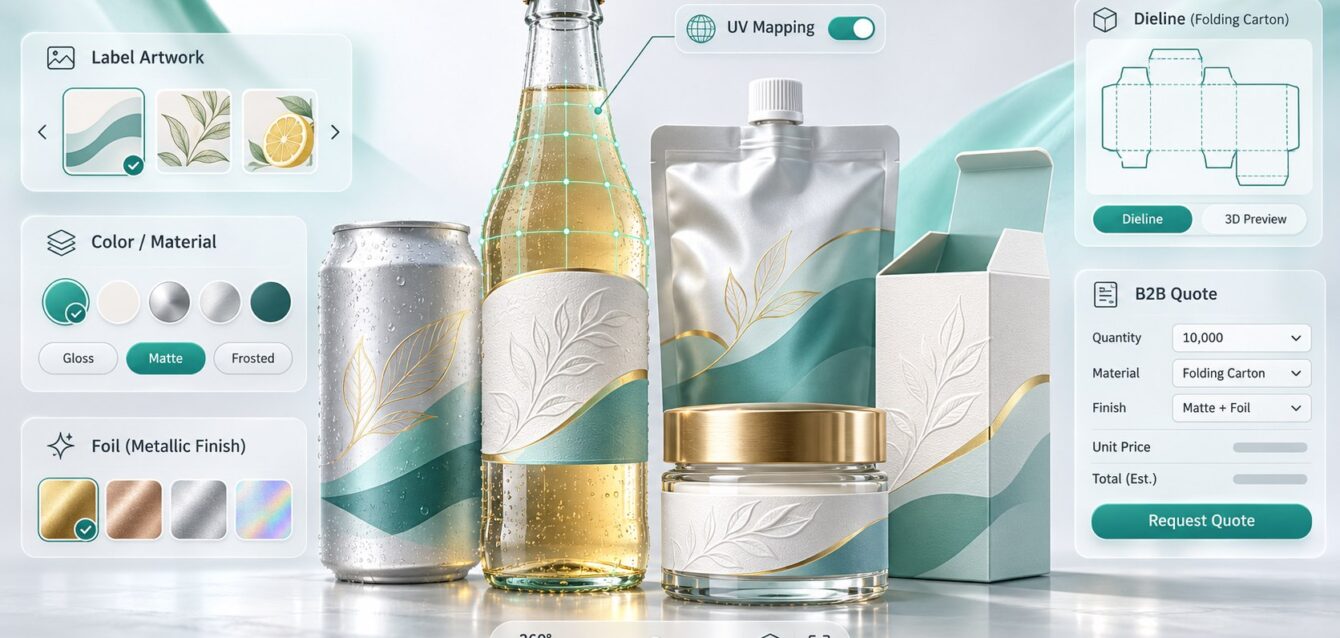
3D packaging configurators let packaging suppliers, beverage teams, cosmetics brands, and retail buyers change bottle shapes, labels, materials, finishes, quantities, and commercial options in a live browser preview. A production-ready system connects WebGL visualization with approved artwork, print specifications, MOQ pricing, and a buyer portal so the visual decision can move directly into quotation and production.
For suppliers serving the US, UK, and Australia, the biggest opportunity is not simply a more attractive product viewer. It is a faster approval workflow. Brand managers can compare SKUs, sales teams can prepare accurate options, and wholesale buyers can approve packaging without waiting for repeated physical samples or interpreting flat dielines.
Replacing Slow Physical Mockups and Flat 2D Dielines
Direct answer: Interactive 3D packaging previews shorten wholesale approval cycles by turning dielines, finishes, and container options into an immediate spatial preview. Buyers can inspect the pack from every angle, compare variants, and confirm specifications before a physical proof is produced, reducing avoidable revision rounds.
A dieline is essential for production, but it is not an intuitive sales tool. Non-technical stakeholders may struggle to imagine how a flat artwork file will wrap around a tapered bottle, fold across a carton edge, or sit beside a metallic closure. Physical mockups solve part of that problem, but each revision adds time, shipping, and prepress effort.
A custom 3D product configurator gives every stakeholder the same visual reference. A buyer can rotate the container, zoom into label details, compare front and back panels, test cap colors, and switch between product variants. Approved selections can be saved under a stable configuration ID so the visual state and quote remain aligned.
Where the workflow creates measurable value
- Fewer artwork misunderstandings before prepress.
- Faster comparison of flavor, fragrance, size, and regional SKUs.
- Clearer review of carton panels, bottle curvature, and label seams.
- Less reliance on one-off rendered images for every variant.
- A reusable configuration record for sales, procurement, and production.
Dynamic Label Artwork and UV Mapping in WebGL
Direct answer: Dynamic WebGL label mapping places approved artwork onto curved bottles, cans, jars, pouches, and cartons through controlled UV coordinates. Buyers can switch SKU artwork or upload a logo while the configurator validates safe areas, aspect ratio, resolution, transparency, and print boundaries.
Label switching becomes difficult when the packaging surface is curved, tapered, flexible, or segmented. A flat image cannot simply be stretched across the model. Each container requires a clean UV layout that defines how two-dimensional artwork maps onto the three-dimensional surface.
For controlled catalogs, the most reliable approach is to offer approved artwork variants from a product information system or digital asset library. Each label can carry metadata for SKU, market, language, print method, revision, and approval status. The buyer sees only valid artwork for the selected container and product family.
Buyer-uploaded artwork needs guardrails
Custom packaging suppliers may allow a buyer to upload a logo or label concept. The browser preview should treat this as an approval aid rather than a substitute for prepress. The interface can enforce file types, minimum resolution, bleed zones, safe areas, and maximum ink coverage guidance while clearly marking the uploaded preview as unverified until production checks are complete.
For folding cartons, a useful interface can show both the assembled 3D pack and its linked dieline view. Selecting a panel in one view highlights the corresponding area in the other, helping buyers understand folds, glue zones, and panel orientation.
Metallic Foil, Matte Varnish and Glass Refraction Shaders
Direct answer: Premium packaging finishes can be simulated in Three.js or PlayCanvas with compact physically based materials. Metallic masks, roughness maps, normal maps, clearcoat controls, and environment lighting reproduce foil, varnish, embossing, glass, and liquid while optimized geometry and KTX2 textures keep delivery lightweight.
Packaging realism depends on how surfaces respond to light. Gold foil must reflect the environment differently from printed yellow ink. Matte varnish changes roughness without changing the base artwork. Embossing needs directional highlights. Clear and tinted glass require believable transmission, thickness, and refraction without overwhelming a mobile GPU.
A scalable material system separates artwork from finish effects. The label artwork provides color. Small masks identify foil, spot varnish, embossing, or transparent windows. The shader combines these layers at runtime, allowing one base asset to represent many commercial options.
Keeping the first experience near or below 2MB
- Remove hidden manufacturing geometry and unnecessary interior surfaces.
- Use Draco or Meshopt compression for container geometry.
- Compress texture maps with KTX2/Basis Universal.
- Load one hero container first and stream alternatives after interaction.
- Reuse shared closures, pumps, caps, and material libraries.
- Use a static poster as the initial paint before WebGL initializes.
Ink & Algorithm’s CAD-to-WebGL optimization pipeline explains the same performance principles for heavier engineering assets.
Print-Ready Specification Export and MOQ Quoting
Direct answer: A packaging configurator should convert every visual choice into structured commercial data: container code, closure, label stock, Pantone reference, foil, varnish, print method, unit volume, quantity, and destination. A pricing service can then return MOQ bands, tooling charges, lead time, and a quote-ready specification.
The browser should never calculate sensitive commercial pricing from untrusted front-end rules alone. It can collect the configuration and display estimates, while an authoritative quoting service validates the combination against supplier data. Complex inputs may include order quantity, customer tier, tooling status, number of colors, decoration area, freight region, and production line availability.
Recommended quote handoff
- The buyer selects a container, closure, artwork, finish, and quantity.
- The rules service confirms that the combination is manufacturable.
- The pricing service applies MOQ bands, setup fees, and account terms.
- The portal generates a configuration ID and visual snapshot.
- A PDF or structured specification is created for buyer review.
- The approved record moves into CRM, ERP, CPQ, or prepress review.
For enterprise workflows, review the ERP, CRM, and CPQ configurator integration guide.
Retail Buyer Portals for CPG and Beverage Teams
Direct answer: A retail buyer portal adds account-specific catalogs, approved packaging options, regional artwork, saved configurations, quote history, and role-based approvals around the 3D experience. It turns a visualizer into a repeatable B2B sales tool rather than an isolated marketing demo.
Different stakeholders need different controls. A distributor may choose only approved case quantities. A brand manager may switch flavor artwork but not bottle tooling. A packaging engineer may review technical dimensions and print methods. An internal sales user may access account pricing and quote status.
Role-based permissions keep the interface relevant while protecting production rules and pricing. Saved projects let buyers duplicate a proven configuration, change a regional label, and request a new quote without rebuilding the pack from zero.
Custom WebGL Build vs SaaS Packaging Plugins
Direct answer: SaaS plugins fit standardized catalogs and simple artwork swaps. A custom WebGL build is stronger when the business needs proprietary finish shaders, complex packaging rules, sub-second interaction, account pricing, deep ERP integration, custom analytics, or ownership of the code, data model, and product roadmap.
| Decision factor | SaaS plugin | Custom WebGL portal |
|---|---|---|
| Launch speed | Faster for standard templates | Requires discovery and engineering |
| Container and finish logic | Platform-dependent | Built around real supplier capabilities |
| Visual realism | Shared rendering system | Custom foil, varnish, glass, and lighting |
| Pricing and MOQ | Standard integrations | Account-specific CPQ or ERP rules |
| Performance | Vendor-controlled payloads | Defined asset and interaction budgets |
| Ownership | Recurring license and dependency | Custom IP and roadmap control |
A headless architecture can keep the WebGL runtime independent from a Shopify Plus theme or custom portal. Lightweight configuration state moves through APIs while heavy assets are delivered from an edge CDN. This prevents the visualizer from bloating the main commerce application.
Implementation Roadmap
Direct answer: Start with one high-value packaging family and a controlled set of containers, labels, and finishes. Define production rules and commercial data before building the interface, then validate material accuracy, mobile performance, quotation logic, and stakeholder approval with a focused pilot.
- Choose the first container family and target buyer journey.
- Audit CAD models, dielines, label files, and finish samples.
- Document valid combinations, MOQ rules, and authoritative systems.
- Set payload, frame-rate, and mobile-browser budgets.
- Build the material and artwork-mapping pipeline.
- Connect quote, CRM, ERP, and prepress handoffs.
- Instrument label changes, saves, quote requests, and approvals.
- Test with buyers, sales teams, packaging engineers, and production owners.
Frequently Asked Questions
What is a 3D packaging configurator?
A 3D packaging configurator is a browser-based application that lets users change containers, labels, colors, closures, finishes, and quantities while viewing the result in real time. Advanced systems validate production rules and connect the approved configuration to quoting and manufacturing workflows.
Can buyers upload their own label artwork?
Yes. A controlled upload workflow can preview buyer artwork on a 3D pack while checking file format, resolution, aspect ratio, safe areas, and transparency. Final artwork should still pass professional prepress validation before production.
Can WebGL realistically show metallic foil and glass?
Yes. Physically based materials, reflection environments, roughness masks, normal maps, transmission, and clearcoat controls can create convincing browser previews. Accuracy depends on calibrated source samples, lighting, and device testing.
Can the configurator calculate MOQ pricing?
Yes. The visual application can send the selected container, print method, finishes, tooling, quantity, and customer account to an authoritative pricing service that returns valid MOQ bands, setup fees, lead time, and quote totals.
Does a custom configurator work with Shopify Plus?
Yes. A headless configurator can connect to Shopify Plus through Storefront APIs, customer accounts, line-item properties, draft orders, or an external B2B quote workflow while keeping the 3D runtime independently optimized.
Build a Packaging Configurator Around Production Reality
The strongest packaging configurators do more than display a polished bottle. They connect approved artwork, accurate materials, manufacturable options, commercial pricing, and buyer approvals in one traceable workflow.
Ink & Algorithm designs high-performance WebGL product configurators and B2B buyer portals for packaging, beverage, cosmetics, and CPG suppliers. Request a packaging configurator architecture consultation to review your containers, dielines, finishes, portal requirements, and ERP or CPQ integrations.