
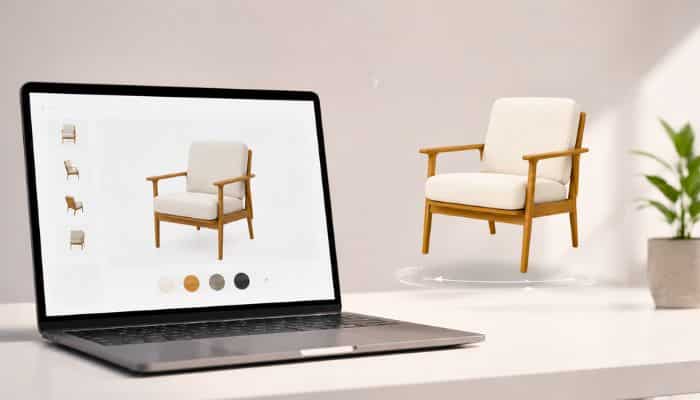
| ⚡ TL;DR — Quick Answer
To add 3D product visualization to your Shopify store in 2026, follow six steps: (1) create high-quality 3D models in glTF/GLB or USDZ format, (2) upload models to your Shopify product admin via the media uploader, (3) install a 3D viewer app from the Shopify App Store or use Shopify’s native model-viewer component, (4) configure AR functionality for iOS Quick Look and ARCore Scene Viewer, (5) optimize mobile performance and loading times, and (6) add tracking analytics to measure engagement and conversion lift. The full implementation typically takes 3 to 12 weeks depending on catalog size, with model creation costs ranging from USD 150 to USD 800 per product. Ink n Algorithm provides complete 3D product visualization services for Shopify merchants — including 3D modeling, AR integration, and conversion optimization. |
Adding 3D product visualization to a Shopify store has become one of the most important commercial upgrades ecommerce brands can make in 2026. Customers expect to rotate, zoom, and explore products before buying — and stores that still rely on flat photography alone are losing measurable conversions to competitors offering richer visual experiences. The good news is that Shopify has built robust native support for 3D models, making integration significantly easier than it was just three years ago. The challenge is doing it well — creating 3D models that look genuinely premium, integrating them smoothly into the product page, and connecting them to augmented reality features that actually drive sales rather than just impress.
This guide walks through every step of adding 3D product visualization to your Shopify store — from creating the 3D models through publishing them on product pages and measuring the commercial impact. Written by the team at Ink n Algorithm based on years of building 3D product visualization integrations for Shopify merchants across retail, fashion, home goods, beauty, and consumer electronics categories in the United States and internationally.
What is 3D product visualization for Shopify?
3D product visualization is the technology that lets customers view ecommerce products as fully interactive three-dimensional models rather than static two-dimensional photographs. Customers can rotate products in any direction, zoom in on specific details, examine materials and textures from multiple angles, and — when augmented reality is enabled — place virtual products in their own physical space using a smartphone camera. On Shopify specifically, 3D product visualization integrates directly into the product page media gallery alongside traditional photography, giving customers a richer way to evaluate products before purchase.
Modern 3D product visualization on Shopify uses industry-standard 3D file formats — primarily glTF/GLB for general WebGL viewing and USDZ for Apple’s AR Quick Look. Shopify’s native model-viewer component handles the rendering directly in the browser without requiring any plugins or app downloads. This native integration is what makes 3D product visualization on Shopify dramatically more accessible in 2026 than it was on other ecommerce platforms historically. Ink n Algorithm’s team works exclusively with these modern formats to ensure maximum compatibility across devices and browsers.
The commercial value of 3D product visualization on Shopify is consistent across categories: higher product page engagement, longer time on site, lower return rates because customers know exactly what they are buying, lifted average order values when buyers feel confident in premium options, and meaningful conversion rate improvements compared to flat photography alone. These outcomes have made 3D product visualization a competitive necessity for serious Shopify brands rather than a premium add-on.
How to add 3D product visualization to Shopify: complete step-by-step process
Adding 3D product visualization to your Shopify store follows six distinct steps from initial 3D model creation through public launch and ongoing optimization. Each step requires specific skills and tools — the difference between a successful 3D product visualization implementation and a disappointing one usually comes down to execution quality at each individual step rather than the overall approach.
| STEP 1 · Create high-quality 3D product models
The foundation of any successful 3D product visualization project is the 3D model itself. Models can be created through three primary methods: traditional 3D modeling using software like Blender, Maya, or Cinema 4D for the highest control and quality; 3D scanning using photogrammetry tools for physical products that already exist; or hybrid workflows combining both approaches. The output format should be glTF or GLB for general WebGL viewing on Shopify, plus USDZ for native iOS AR Quick Look support. Model file sizes should generally stay under 10MB per product for optimal mobile loading. Material work is critical — physically based materials with proper roughness, metalness, and normal maps separate professional 3D product visualization from amateur work that looks obviously digital. |
| STEP 2 · Upload 3D models to your Shopify product admin
Shopify’s product admin interface natively supports 3D models alongside traditional photography. Navigate to any product in your Shopify dashboard, scroll to the Media section, and drag or upload your 3D model files directly. Shopify accepts glTF, GLB, and USDZ formats. The 3D model appears in the product page media gallery automatically, with rotation controls and AR buttons added by default. No additional configuration is required for basic 3D product visualization — Shopify’s native infrastructure handles rendering, controls, and AR integration without any app installation. This native integration is one of the biggest reasons 3D product visualization has accelerated on Shopify specifically. |
| STEP 3 · Install advanced 3D viewer apps for premium features
While Shopify’s native 3D product visualization works well for basic needs, premium ecommerce experiences often require advanced features beyond the default viewer. The Shopify App Store offers several 3D viewer applications that add capabilities like customizable backgrounds, advanced lighting controls, animation playback, hotspot annotations, color/material customization, and detailed analytics. Some 3D product visualization apps also integrate directly with product configurators for fashion, footwear, and customizable goods. Ink n Algorithm’s combined 3D web configurator services produce particularly powerful integrations for Shopify merchants needing customization beyond what stock apps provide. |
→ Learn more about Ink n Algorithm’s 3D web configurator services for advanced Shopify customization.
| STEP 4 · Configure AR functionality for iOS and Android
Augmented reality is what transforms 3D product visualization from a viewer into a genuine sales tool. On iOS devices, Apple’s AR Quick Look automatically handles AR display when customers view USDZ files — no configuration needed. On Android, Google’s Scene Viewer reads glTF/GLB files for ARCore-powered AR placement. Customers tap the AR button on the product page and instantly see your product placed in their real-world environment at true scale. This place-in-room functionality is particularly powerful for furniture, home goods, large electronics, and any product where customers need to verify how it fits in their actual space before buying. |
→ Studios specializing in AR development can extend AR capabilities far beyond the Shopify defaults.
| STEP 5 · Optimize 3D product visualization for mobile performance
Most ecommerce browsing happens on mobile devices, and 3D product visualization is particularly demanding on mobile graphics processors. Poor optimization causes long loading times, stuttering rotation, battery drain, and visible quality degradation that damages brand perception. Optimization includes reducing polygon counts to under 50,000 triangles per model where possible, compressing textures using KTX2 or Basis Universal formats, implementing progressive loading so basic geometry appears quickly before high-resolution textures stream in, and aggressive caching strategies through Shopify’s CDN. Without these optimizations, even beautiful 3D product visualization fails commercially because customers abandon before the model finishes loading. |
||
| STEP 6 · Add analytics, track engagement, and optimize for conversion
Adding 3D product visualization to Shopify is just the start — the real commercial value comes from measuring and optimizing impact. Implement event tracking through Google Analytics 4 or Shopify’s native analytics to monitor which products receive the most 3D engagement, how long customers interact with 3D models, whether AR usage correlates with purchase, and which 3D-enabled products show conversion lift compared to flat-photography equivalents. Use these insights to prioritize 3D model creation for high-traffic products, refine model quality where engagement is below expectations, and identify product categories where 3D product visualization delivers the strongest commercial returns. Without measurement, you cannot tell whether your investment is working. |
||
| An honest implementation reality
The six steps above are the right process, but execution quality varies enormously based on the team handling them. Cheap 3D models from gig marketplaces look obviously fake and damage brand perception. Poorly optimized models destroy mobile performance and lose customers before they engage. Generic viewer apps without proper integration miss the conversion lifts that justify the investment. Working with experienced 3D product visualization specialists like Ink n Algorithm delivers measurably better commercial outcomes than DIY approaches or budget agency work. |
||
What are the best practices for 3D product visualization on Shopify?
Beyond the basic implementation steps, six specific best practices separate Shopify merchants who win with 3D product visualization from those who add 3D models without seeing commercial impact.
- Prioritize 3D product visualization for high-AOV products where the visual investment justifies model creation cost
- Use real-world material samples and scanning rather than estimated textures for premium product categories like jewelry, watches, and luxury fashion
- Always include AR Quick Look (USDZ) and Scene Viewer (glTF) versions for maximum cross-platform AR compatibility
- Optimize file sizes ruthlessly — under 5MB per model is ideal for mobile shopping experiences
- Position the 3D viewer prominently in the product page hierarchy rather than hiding it behind tabs
- Run A/B tests comparing product pages with and without 3D product visualization to measure actual conversion lift
How much does 3D product visualization cost for Shopify in 2026?
3D product visualization costs vary significantly by product complexity, quality requirements, and catalog size. Use these ranges as realistic starting points for serious Shopify 3D product visualization projects in 2026.
- Basic 3D model per product (simple geometry, standard materials): USD 150 to USD 400
- Premium 3D model per product (complex geometry, scanned materials, photoreal quality): USD 400 to USD 1,500
- 3D scanning service for physical products: USD 200 to USD 800 per product
- Custom 3D viewer development with brand-specific features: USD 8,000 to USD 30,000
- Full Shopify 3D product visualization implementation (catalog of 50-100 products): USD 25,000 to USD 100,000
Lower-end pricing reflects basic geometry and standard material quality suitable for general consumer products. Premium pricing reflects photoreal quality with scanned real-world materials, animation support, advanced AR features, and custom integration with Shopify’s product page templates. For luxury brands, premium products, or high-AOV categories, the investment in higher-quality 3D product visualization consistently pays back through measurable conversion improvements.
Which Shopify product categories benefit most from 3D product visualization?
3D product visualization delivers commercial returns across virtually every Shopify category, but certain product types see particularly strong commercial impact. These categories share specific characteristics: high consideration purchases, visual complexity that flat photography cannot fully capture, or scenarios where customers benefit from visualizing the product in their own context.
- Furniture and home goods — where AR place-in-room dramatically reduces returns and increases buyer confidence
- Fashion and footwear — where customers want to examine materials, stitching, and details from every angle
- Jewelry and watches — where premium pricing depends on perceived quality that flat photography under-represents
- Consumer electronics — where customers want to understand product dimensions, ports, and physical details
- Beauty and personal care — where packaging design and product form benefit from rotation and zoom
- Home decor and lighting — where AR previews directly impact buying decisions about fit and aesthetic
| Need help adding 3D product visualization to your Shopify store?
Ink n Algorithm provides complete 3D product visualization services for Shopify merchants across the United States and internationally — from initial 3D modeling through Shopify integration, AR setup, performance optimization, and ongoing analytics. We work across the full ecommerce stack including 3D modeling, web configurators, AR development, and animation to deliver integrated experiences. Tell us about your project at https://inknalgorithm.com/contacts/ and a senior team member will respond within one business day with indicative timeline, budget framing, and recommendations. You can also explore the Ink n Algorithm portfolio for recent 3D product visualization work. |
Frequently asked questions
Does Shopify natively support 3D product visualization?
Yes. Shopify offers native support for 3D models in glTF, GLB, and USDZ formats directly in the product admin interface. Merchants can upload 3D models alongside traditional photography, and Shopify’s built-in model-viewer component handles rendering, rotation controls, and AR integration without any app installation. This native integration is one of the biggest reasons 3D product visualization has accelerated on Shopify specifically compared to other ecommerce platforms.
What file format should 3D models for Shopify use?
Shopify accepts three primary 3D file formats: glTF (.gltf) and GLB (.glb) for general WebGL viewing and Android ARCore Scene Viewer compatibility, plus USDZ (.usdz) for native iOS AR Quick Look support. Best practice is providing both glTF/GLB and USDZ versions of every product to ensure maximum cross-platform AR compatibility. Ink n Algorithm provides 3D models in all required formats as standard deliverables.
How long does 3D product visualization take to implement on Shopify?
Implementation timelines depend primarily on catalog size and model quality requirements. Adding 3D product visualization to a small catalog of 10 to 20 products typically takes 3 to 6 weeks. Mid-size catalogs of 50 to 100 products take 8 to 16 weeks. Large catalogs require longer, often staged in phases by product category. Each individual 3D model typically takes 1 to 5 days to create depending on complexity and quality requirements.
Does 3D product visualization actually increase Shopify sales?
Shopify’s own data and merchant case studies consistently show meaningful conversion improvements from well-implemented 3D product visualization, particularly when paired with AR functionality. Categories like furniture, fashion, and home goods typically see the strongest impact. The key qualifier is implementation quality — poor 3D models actively damage performance, while professional 3D product visualization built by experienced teams like Ink n Algorithm delivers measurable returns.
Can 3D product visualization work without an app from the Shopify App Store?
Yes. Shopify’s native 3D model support means you can add 3D product visualization to your store without installing any third-party apps. Simply upload 3D models in supported formats through the product admin, and Shopify renders them automatically with built-in AR functionality. Third-party apps add advanced features like customization, configurators, hotspots, and analytics — but basic 3D product visualization works natively.
How do we start a Shopify 3D product visualization project with Ink n Algorithm?
Contact Ink n Algorithm through the contact page with a brief description of your Shopify store, product categories you want to convert to 3D product visualization, target launch timeline, and any specific features beyond standard implementation. A senior team member will respond within one business day, typically with a structured discovery call to scope the 3D product visualization project properly before any formal proposal.
FAQ
How much does to add 3d product visualization cost?
The cost varies based on project scope and complexity. Contact us for a custom quote tailored to your specific needs.
How long does to add 3d product visualization take?
Typical projects take 2-8 weeks depending on scope. We provide detailed timelines during consultation.
Do you work with US brands?
Yes, we work with US brands across all 50 states. Our team understands the US market and delivers solutions that drive results.