
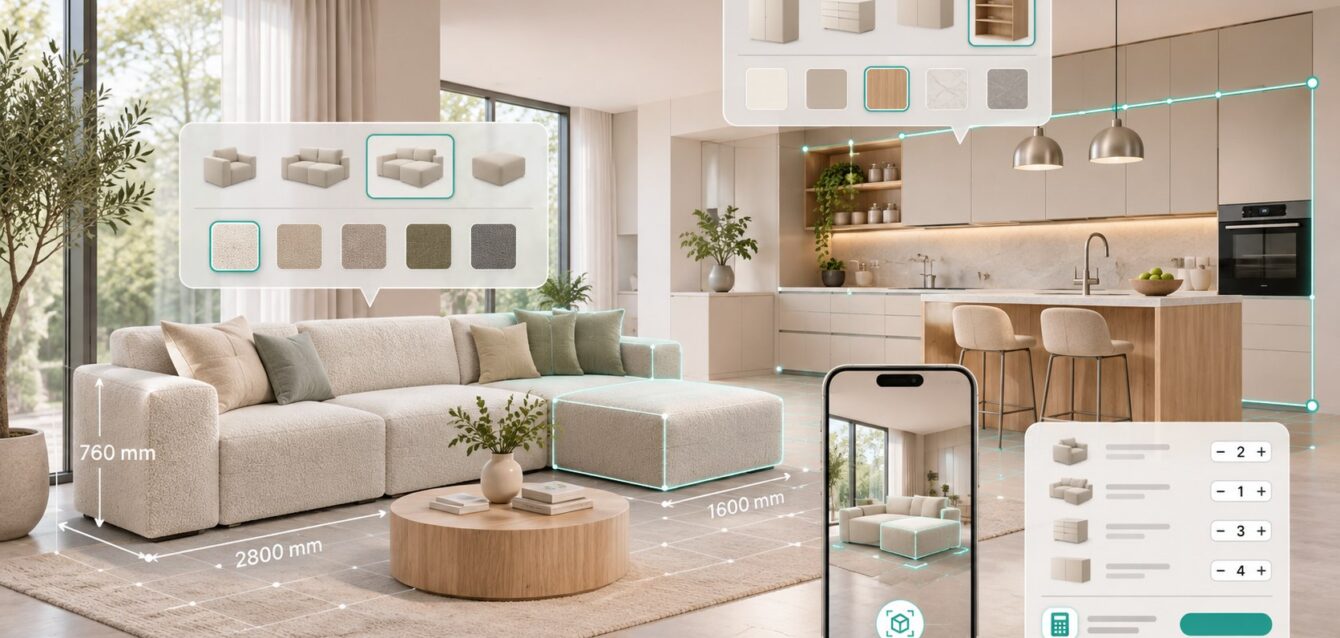
Interactive 3D furniture and modular kitchen configurators let shoppers assemble, resize, finish, price, and place products in a room before they buy. A production-ready system combines real-time WebGL visualization, parametric rules, mobile WebAR, commerce checkout, and ERP pricing so every visual choice maps to a manufacturable SKU, dimension, and price.
For furniture, cabinetry, and interior brands in the US, UK, and Australia, the commercial decision is no longer simply “2D planner or 3D viewer.” The real question is whether an off-the-shelf SaaS builder can represent the product rules and sales process accurately—or whether a custom 3D product configurator is needed to protect performance, integration depth, and long-term ownership.
The Return-Rate and Sizing Problem in Online Furniture
Direct answer: Real-time 3D inspection and WebAR room placement reduce expectation gaps by showing scale, proportions, finishes, and valid configurations before checkout. Return-rate improvements of 20% to 35% can be realistic targets in mismatch-prone categories, but brands should validate results against their own return reasons and matched product cohorts.
Furniture is difficult to evaluate from flat photography. A sofa may look smaller online than it feels in a living room. A kitchen island may block circulation. A cabinet finish can appear warmer or cooler under different lighting. Modular products add another layer: buyers must understand how pieces connect, which dimensions are valid, and whether the final configuration fits the intended space.
A useful configurator addresses these questions directly. Shoppers rotate the product, inspect details, change fabric or timber, modify dimensions within approved limits, and see the result immediately. Dimension callouts and room-placement tools turn abstract measurements into spatial understanding.
WebAR adds a practical final check. A shopper can place the configured sofa, shelving system, or cabinet run in a room at approximate 1:1 scale without installing an application. The experience should preserve the selected configuration when the shopper returns to the product page so the buying journey continues without repeated work.
Measure whether visualization improves decision quality
- Track configurator launch and valid configuration completion.
- Compare configured and non-configured add-to-cart rates.
- Segment returns by “wrong size,” “finish mismatch,” and “not as expected.”
- Measure premium fabric, finish, and accessory selection.
- Connect saved configurations to quotes, orders, and support cases.
Parametric Modular Snapping Logic
Direct answer: Parametric snapping logic places modules on controlled attachment points, validates dimensions and orientation, detects collisions, and blocks combinations that cannot be manufactured or installed. Three.js or PlayCanvas can render the experience, while a separate rules service validates product logic and commercial data.
An L-shaped sectional is not a collection of independent 3D models. Each seat, corner, chaise, arm, and ottoman has permitted neighbors, orientations, connection points, and dimensional constraints. Modular shelving has bay widths, load limits, uprights, door clearances, and wall conditions. Kitchens add cabinet grids, appliance gaps, fillers, worktop rules, plumbing zones, and corner logic.
The configurator should represent these rules as structured data rather than hard-coded visual exceptions. Each module can expose compatible connection points and metadata such as width, depth, height, side, minimum clearance, product code, and price key. When a buyer drags a module near a valid position, the interface previews the snap, validates the combination, and confirms placement only when the state remains buildable.
Collision and clearance checks
Basic collision detection prevents modules from occupying the same space. Commercial systems also need clearance rules. Drawers require opening space. Cabinet doors can clash with walls or adjacent handles. Kitchen work zones need practical movement. A visual planner should explain invalid placement in plain language instead of silently refusing the action.
Save one stable configuration record
The visual state should generate a stable configuration ID containing product modules, dimensions, finishes, orientation, pricing references, and rules version. Sales, manufacturing, customer service, and the buyer should be able to reopen the same result. This is essential when a design moves from browser exploration to quote, approval, checkout, or production.
Sub-2MB Fabric and Wood-Grain Optimization
Direct answer: A fast furniture configurator keeps the first useful 3D payload near or below 2MB where product complexity allows. This requires cleaned geometry, instanced modules, Draco compression, KTX2 textures, shared material libraries, staged loading, and device testing on mobile Safari and Chrome.
Furniture materials are visually demanding. Bouclé needs visible weave and soft roughness. Leather needs grain without looking plastic. Oak requires believable direction, scale, and variation. Loading a separate 4K texture set for every fabric and timber option will quickly overwhelm mobile bandwidth and GPU memory.
Build a controlled material system. Use tileable texture sets at resolutions based on actual screen coverage. Pack compatible channels, compress textures with KTX2/Basis Universal, and load only the selected finish at full working quality. Lower-resolution previews can appear instantly while detailed maps stream after selection.
Geometry and rendering controls
- Remove hidden manufacturing geometry and unseen hardware.
- Instance repeated legs, handles, shelves, hinges, and cabinet modules.
- Limit separate materials and draw calls.
- Use progressive levels of detail for close-up inspection.
- Avoid expensive real-time shadows and transparent layers on mobile.
- Test sustained frame rate, memory, and thermal behavior on real devices.
For a deeper engineering workflow, review Ink & Algorithm’s guide to preparing CAD files for sub-2MB WebGL delivery.
Shopify Plus, WooCommerce and ERP Integration
Direct answer: A furniture configurator should pass product IDs, dynamic dimensions, material SKUs, accessories, price modifiers, and a configuration reference into checkout or a quote workflow. ERP or CPQ services should remain authoritative for complex pricing, availability, BOM generation, and production validation.
For standard ecommerce products, Shopify Plus or WooCommerce can manage the cart and checkout. The configurator maps valid visual selections to purchasable variants, line-item properties, bundles, or a concise configuration ID. Before cart creation, the server should confirm availability, price, and compatibility.
Complex kitchens and made-to-order furniture often exceed native variant models. Pricing may depend on dimensions, material tiers, hardware, installation region, dealer account, quantity, or manufacturing rules. In these cases, the configurator sends normalized configuration data to a CPQ or ERP integration layer. The trusted service returns price, lead time, BOM references, and any approval requirements.
Recommended data flow
- The browser manages interaction and visual state.
- A rules service validates dimensions and compatible modules.
- Commerce APIs provide catalog, customer, and checkout context.
- ERP or CPQ services calculate complex price, BOM, and lead time.
- The final order stores a stable configuration ID for traceability.
Read the full ERP, CRM, and CPQ integration guide for enterprise handoffs.
Custom WebGL vs Off-the-Shelf 2D and SaaS Builders
Direct answer: SaaS builders are suitable when products fit predefined templates, integrations are standard, and recurring licensing is acceptable. Custom WebGL is better when the brand requires unique parametric rules, premium materials, mobile performance control, deep ERP integration, custom analytics, or ownership of the experience and roadmap.
| Decision factor | Off-the-shelf builder | Custom WebGL/WebAR |
|---|---|---|
| Initial setup | Usually faster | Requires product discovery and engineering |
| Product rules | Template-dependent | Built around real manufacturing logic |
| Visual identity | Limited interface control | Brand-specific UX and material quality |
| Integrations | Standard connectors | Custom commerce, ERP, CRM, and CPQ |
| Performance | Vendor-controlled | Asset budgets and loading strategy controlled |
| Ownership | Subscription and vendor dependency | Custom IP and roadmap control |
Cost and Timeline Breakdown
Direct answer: A focused WebGL furniture customizer commonly ranges from $15,000 to $35,000. A multi-module headless configurator with deeper commerce logic may range from $25,000 to $45,000. Enterprise CPQ builds with ERP integration, automated BOMs, account pricing, and approval workflows commonly start around $35,000 and can exceed $75,000.
| Scope | Typical range | Indicative timeline |
|---|---|---|
| Focused WebGL customizer | $15,000–$35,000 | 8–14 weeks |
| Multi-module commerce configurator | $25,000–$45,000 | 12–20 weeks |
| Enterprise CPQ + ERP/BOM | $35,000–$75,000+ | 16–32+ weeks |
Final pricing depends on catalog size, CAD quality, material count, snapping complexity, room-planning features, AR, account pricing, integrations, and content-maintenance requirements. These ranges are planning benchmarks, not fixed quotations.
Implementation Checklist for Furniture and Kitchen Brands
- Choose one high-value product family for the first release.
- Document every module, dimension, finish, SKU, and invalid combination.
- Confirm the authoritative systems for price, inventory, and lead time.
- Set mobile performance and initial payload budgets.
- Define WebAR scale validation and fallback content.
- Map cart, quote, CRM, ERP, and production handoffs.
- Instrument configuration, save, quote, cart, and purchase events.
- Test with real customers, dealers, sales teams, and production owners.
Frequently Asked Questions
What is a 3D furniture configurator?
A 3D furniture configurator is a browser-based tool that lets shoppers change dimensions, modules, materials, finishes, and accessories while viewing the result in real time. Advanced systems validate product rules, calculate pricing, place the configuration in AR, and pass an order-ready record to commerce or CPQ systems.
Can a modular kitchen planner run in a browser?
Yes. Three.js or PlayCanvas can deliver modular kitchen planning through WebGL without a desktop installation. The experience must use optimized assets, controlled snapping rules, and server-side validation for pricing and manufacturability.
How much does a custom sofa configurator cost?
A focused custom sofa configurator commonly falls in the $15,000 to $35,000 range. Multi-module systems with room planning, AR, commerce integration, account pricing, or ERP/CPQ workflows can range from $35,000 to $75,000 or more.
Does furniture AR work on iPhone and Android?
Yes. Product placement can be delivered through compatible browser and device AR workflows on iOS and Android. Cross-device testing, accurate scale, optimized models, and a clear fallback remain essential.
Can the configurator create a BOM for manufacturing?
Yes. When modules and options map to controlled product codes, the final configuration can generate or request an automated bill of materials through a CPQ or ERP integration service.
Build a Furniture Configurator Around Real Product Logic
The strongest furniture and kitchen configurators combine buyer confidence with operational accuracy. They show the right product, enforce the right rules, calculate the right price, and preserve one trusted configuration from room planning to production.
Ink & Algorithm designs high-performance WebGL and WebAR product experiences for furniture, cabinetry, and configurable-product brands. Request a configurator architecture and pricing consultation to review your catalog, CAD assets, commerce platform, and ERP requirements.