
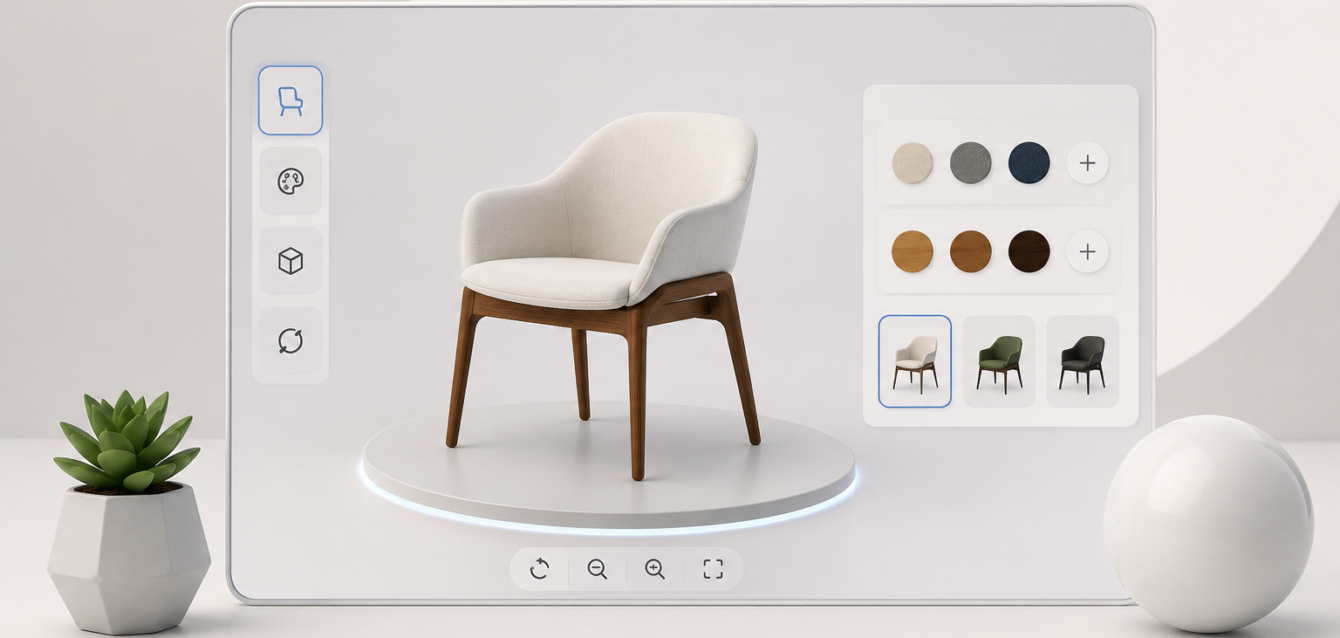
A 3D Product Configurator is changing the way brands present, sell, and personalize products online. Instead of asking customers to imagine how a sofa would look in another fabric, how a vehicle would appear with different wheels, or how a piece of furniture would look in another finish, a configurator lets them see those changes happen in real time. The experience turns a traditional product page into an interactive digital showroom where customers can rotate, zoom, customize, compare, and sometimes even preview a product inside their own environment. Modern configurators combine 3D modeling, real-time rendering, product configuration logic, interactive interfaces, and e-commerce integration to create a more visual buying journey. Current industry resources describe these systems as browser-based applications that allow users to modify colors, materials, dimensions, components, and other product attributes while immediately seeing the result in 3D. For brands selling customizable or premium products, this is more than a visual upgrade. It can become a practical sales tool that reduces uncertainty, communicates product options more clearly, supports personalization, and gives customers a stronger reason to engage with a product before making a purchase. In 2026, as digital commerce becomes increasingly experience-driven, 3D product configuration offers a compelling bridge between the physical product customers want and the digital experience through which they discover it.
What Is a 3D Product Configurator?
A 3D Product Configurator is an interactive digital application that allows customers to customize a product while viewing the changes through a real-time three-dimensional model. Rather than presenting a collection of separate product photographs for every possible variation, the system uses a digital product model with configurable components, materials, colors, finishes, dimensions, accessories, or other options. When a customer selects an option, the 3D representation changes according to predefined configuration rules. A furniture shopper, for example, might choose a sofa size, fabric, leg style, cushion design, and color, while an automotive customer could select paint, wheels, trim, seats, and accessories. The purpose is simple: let customers see what they are creating before they commit to buying it. Modern systems can run directly inside web browsers using technologies such as WebGL and can combine the visual layer with pricing, product data, compatibility rules, and commerce functionality. This makes a configurator fundamentally different from a normal image gallery. A gallery shows what a product looks like; a 3D configurator lets the customer participate in creating the version they want. That distinction becomes especially valuable when a product has dozens, hundreds, or potentially thousands of combinations that would be impractical to photograph individually.
How a 3D Product Configurator Works
Behind the simple customer interface is a combination of 3D assets, materials, configuration rules, rendering technology, and product data. First, the product needs an accurate digital 3D model that represents its geometry and can support the available variations. Different materials and textures can then be prepared so that selections such as leather, wood, metal, fabric, glass, or paint can be displayed realistically. A rules engine controls which combinations are valid, meaning the system can prevent customers from selecting options that cannot physically or commercially exist together. The visual engine then updates the product in real time whenever the customer makes a selection. In advanced implementations, the configuration can also influence price, SKU information, inventory, quotations, manufacturing specifications, or checkout data. Unity describes product configurators as systems that can combine digital product models with configuration logic, real-time visualization, pricing, and technical validation, particularly in complex manufacturing and industrial applications. The result is a system that feels simple to the customer but behaves like a sophisticated digital product engine behind the scenes. Good configuration technology therefore requires more than simply putting a 3D model on a webpage. It requires careful planning of the product structure, user interface, performance, asset optimization, business rules, and integration architecture.
Why 3D Product Configurators Are Changing Digital Commerce
Traditional e-commerce depends heavily on static photographs, product descriptions, variant selectors, and imagination. That approach works reasonably well when the product has only a few variations, but it becomes increasingly difficult when customers need to make multiple visual decisions before buying. Imagine selling a premium modular sofa with ten fabrics, six colors, three leg finishes, four sizes, and several configurations. Photographing every possible combination quickly becomes expensive and operationally complicated. A 3D product configurator approaches the problem differently by creating a reusable digital product system capable of generating many combinations from a controlled set of assets. Current configurator platforms and industry guides increasingly position the technology as a way to move customers from passive browsing toward active product exploration. This matters because personalization is not simply about giving customers more choices; it is about helping them understand those choices. When shoppers can instantly see the consequences of their decisions, product customization becomes easier to understand. Instead of wondering whether a particular fabric will work with a certain frame or whether a particular finish matches the rest of a product, the customer receives visual feedback immediately. That can make the buying process feel less like filling out a form and more like working with a digital product specialist.
From Static Product Images to Interactive Experiences
The shift from static photography to interactive 3D is similar to the difference between looking at a map and exploring a city with a guide. A photograph gives customers information from one carefully selected angle, while an interactive model allows them to control what they see. They can rotate a product, zoom into details, inspect finishes, compare options, and build a version that matches their preferences. This is particularly useful for products where shape, proportion, material, texture, and configuration strongly influence the purchase decision. Current 2026 resources describe 3D configurators as browser-based experiences capable of updating product visuals instantly without requiring a plugin or application installation. The interactive nature also creates a deeper relationship between the customer and the product. Instead of simply reading “available in walnut,” the shopper can select walnut and immediately see it applied to the product. Instead of seeing “large,” “medium,” and “small” as abstract options, the customer can visualize the difference. This turns product information into something experiential. For brands competing in crowded markets, that experience can become part of the brand identity itself, especially when the configurator is designed with thoughtful interaction, realistic materials, intuitive controls, and fast performance.
Key Features of a Modern 3D Product Configurator
A professional 3D product configurator should do much more than display a spinning model. The strongest implementations combine visualization with configuration intelligence, commerce functionality, responsive design, and a carefully designed user experience. Customers should be able to understand the available choices without feeling overwhelmed, while the system should accurately reflect the business rules behind those choices. Essential functionality can include real-time model updates, material switching, color selection, component replacement, size adjustments, camera controls, pricing updates, configuration summaries, product specifications, and direct calls to action. Advanced configurators may add saved configurations, shareable designs, downloadable specifications, AR visualization, quote generation, manufacturing integration, or connections to ERP and CRM platforms. NVIDIA describes modern product configurators as visualization systems that can use digital twins, configuration rules, and real-time technologies to help users create and evaluate product variations. The important point is that every feature should serve a purpose. Adding dozens of controls does not automatically make a configurator better. A successful interface makes customization feel natural, keeps the customer oriented, provides immediate visual feedback, and removes unnecessary friction between choosing an option and understanding the final product.
Real-Time Product Customization
Real-time customization is the central experience behind a 3D configurator. A customer should be able to select an option and see the corresponding change without waiting for a new page, loading a collection of separate photographs, or restarting the product experience. This responsiveness creates a sense of control that static product pages cannot easily reproduce. For example, a furniture customer can switch from light oak to walnut, change the upholstery, alter the configuration, and inspect the result from another angle while remaining on the same interface. Real-time updates can also be connected to pricing, allowing the customer to understand how personalization affects the final cost. That transparency can be particularly valuable for premium or made-to-order products where customization directly influences price. A well-designed system therefore treats visualization and commerce as connected experiences rather than separate functions. The customer is not merely looking at a model; they are progressively constructing a purchasable product. That makes the configurator both a visualization tool and a guided decision-making environment.
Materials, Colors, Sizes, and Components
The exact customization options depend on the product, but the most common variables include color, material, finish, dimensions, components, accessories, and configurations. A kitchen configurator might allow customers to modify cabinet colors, worktops, handles, layouts, and appliances. A furniture configurator could provide fabric, leather, wood, metal, dimensions, legs, cushions, and modular sections. An industrial configurator may go much deeper, allowing users to select technical components, capacities, specifications, and compatible assemblies. The system needs accurate configuration rules because visual flexibility without product accuracy can create serious problems. If a customer can build something online that the manufacturer cannot actually produce, the impressive interface becomes a liability. This is why professional configurator development combines 3D visualization with structured product logic. The visual model needs to represent the actual product, while the configuration engine needs to understand which choices can coexist. The strongest solutions effectively create a digital representation of the product catalog where every customer-facing option is connected to the underlying business logic.
How 3D Configurators Improve the Customer Experience
One of the biggest advantages of a 3D Product Configurator is that it addresses a fundamental weakness of online shopping: customers cannot physically touch or inspect the product. This becomes even more challenging when the item is customized. A customer might understand that a chair is available in “charcoal fabric,” but understanding exactly how that fabric will appear across the entire product can be difficult from a small color swatch. A 3D configurator can make that decision visual. The shopper sees the material applied to the model, rotates the product, zooms in, and evaluates the combination from multiple perspectives. Shopify notes that product configurators can reduce purchasing barriers by helping shoppers visualize customized products and understand pricing, while interactive visualization can be particularly useful for higher-value products or products with complex customization. The experience also gives customers a greater sense of ownership because they are actively shaping the product. That psychological shift can be powerful: instead of asking whether they want “your product,” customers begin thinking about whether they want their version of the product. A thoughtfully designed configurator therefore supports both functional decision-making and emotional engagement.
3D Product Configurator vs. Traditional Product Visualization
Traditional product visualization and 3D configuration are related, but they are not the same thing. A 3D product rendering generally produces a finished image or animation that presents a product from a particular angle or in a particular environment. A 360-degree viewer provides additional interaction, but the available visual states may still be predetermined. A 3D configurator introduces a layer of live customization in which the customer controls product variables and the system generates the appropriate visual result. Industry comparisons published in 2026 highlight this distinction: static variant photography can require separate imagery for combinations, while a real-time 3D system can reuse a digital model and swap predefined materials or components dynamically. This can dramatically change the economics of visual product content for businesses with large numbers of variants. Instead of producing a separate photoshoot for every combination, a brand can maintain a structured 3D asset system. That does not mean photography becomes obsolete; high-quality product photography still has an important place in e-commerce. Instead, 3D configuration adds another layer of product communication for situations where interaction and customization matter.
| Feature | Static Product Images | 360° Viewer | 3D Product Configurator |
|---|---|---|---|
| Product rotation | Limited | Yes | Yes |
| Real-time customization | No | Usually limited | Yes |
| Material switching | Static images required | Limited | Yes |
| Multiple product combinations | Expensive to photograph | Limited | Highly scalable |
| Dynamic pricing | No | Usually no | Possible |
| AR integration | Separate implementation | Sometimes | Commonly supported |
| Configuration rules | No | Limited | Yes |
| E-commerce integration | Basic | Moderate | Advanced |
Benefits of a 3D Product Configurator for Businesses
For businesses, the value of a 3D configurator extends beyond visual appeal. A well-implemented system can support marketing, sales, customer service, product education, lead generation, and operational workflows. Customers can explore product options independently instead of relying entirely on sales representatives to explain every variation. Sales teams can use the same digital experience during consultations or presentations, while manufacturers can connect configuration selections with technical specifications and quotation processes. Unity highlights benefits such as improved product experiences, sales support, cost efficiencies, and the ability to distribute interactive experiences across different platforms. Configurators can also create useful behavioral data because brands can understand which options customers explore most frequently and which configurations lead toward inquiries or purchases. That information can influence merchandising and product strategy. A company might discover, for example, that customers repeatedly select a particular material combination or accessory package. Instead of relying purely on assumptions, the business can learn from actual configuration behavior. The technology therefore has the potential to become both a customer-facing sales experience and a source of product intelligence.
Higher Engagement and Purchase Confidence
Interactive experiences naturally create more opportunities for customers to engage with a product. Instead of scrolling through images, the visitor is making decisions, testing combinations, and exploring details. This can make the product page more memorable and can give shoppers more information before purchase. A 2026 benchmark published by VisionThree reports substantial performance differences across its customer base, including a median conversion uplift for configurable product detail pages and higher average order value, although such figures should be treated as vendor-reported benchmarks rather than universal guarantees. The broader lesson is more useful than any single percentage: configuration can create commercial value when the product genuinely benefits from customization and the experience is implemented well. A slow, confusing configurator will not magically improve conversion. A fast, intuitive, visually accurate one can help customers make decisions with greater confidence. That distinction matters when evaluating ROI. Businesses should measure configurator performance against their own baseline rather than assuming industry statistics will automatically apply.
Better Product Personalization
Personalization is one of the clearest reasons to invest in configuration technology. Customers increasingly expect products to reflect their preferences, and a configurator makes personalization tangible rather than theoretical. Instead of presenting a long list of options in a dropdown menu, the system shows customers what their selections actually create. That can also support upselling because premium finishes, upgraded materials, accessories, and additional features can be introduced naturally during the configuration process. Rather than pushing an unrelated promotional banner, the interface can present an upgrade in the context of the product being designed. This is particularly effective when the additional option has a visible effect. A customer may be more willing to choose premium leather when they can instantly see the difference instead of simply reading the word “premium.” The configurator becomes a digital salesperson that explains the product visually while allowing the customer to remain in control. When personalization, pricing, and visualization work together, customization can become part of the purchasing journey rather than an obstacle within it.
3D Product Configurators for E-Commerce Brands
E-commerce brands are among the strongest candidates for 3D product configurator development, particularly when they sell customizable, premium, modular, or made-to-order products. Furniture, footwear, jewelry, kitchens, lighting, home décor, vehicles, electronics, and lifestyle products can all benefit from interactive configuration when customers need to compare visual options. A customer purchasing a standard commodity product may not need a configurator, but someone purchasing a customized sofa or expensive piece of furniture often wants greater certainty before placing an order. Current industry guidance identifies products with multiple colors, materials, sizes, components, or customization choices as particularly suitable for 3D configuration. E-commerce integration is also important because the experience should not end when the customer finishes designing. Ideally, the selected configuration can feed into a product SKU, cart, quote, or checkout process. Depending on the business model, the system might send the configuration to a sales team rather than directly to checkout. The right workflow depends on the product and sales process, but the principle remains the same: the digital configuration should connect naturally to the next commercial step.
3D Configurators for Furniture and Interior Brands
Furniture is one of the most natural applications for interactive 3D configuration because customers frequently need to evaluate materials, dimensions, finishes, and layouts before ordering. A static furniture image cannot show every possible combination, especially when a product line contains many upholstery fabrics, wood finishes, leg styles, sizes, and modular arrangements. A configurator can place those choices into a single interactive environment. A customer can change the fabric, rotate the sofa, adjust its configuration, compare finishes, and potentially preview the result in their own room through augmented reality. Industry resources specifically identify furniture and home furnishing as strong use cases because customers often need visual confidence before purchasing customizable products. For furniture brands, the opportunity goes beyond improving the product page. The same 3D assets can support showrooms, sales presentations, marketing campaigns, AR experiences, digital catalogs, and product visualization. That creates a reusable digital asset ecosystem rather than a one-purpose website feature. When planned correctly, the configurator becomes a central visual layer connecting product design, commerce, marketing, and customer experience.
3D Product Configurators for Automotive and Manufacturing
Automotive and manufacturing companies can use configurators for much more complex scenarios than simple color selection. A vehicle configurator might allow customers to choose paint, wheels, interior materials, trims, technology packages, and accessories. In manufacturing, a configurator may allow buyers or sales teams to define equipment specifications, technical components, dimensions, capacities, or compatible modules. This is where configuration logic becomes especially important because the system must understand technical relationships between options. Unity explains that industrial product configurators can help buyers specify requirements while validating technical feasibility and generating accurate pricing or specifications. The commercial value can be significant because complex B2B products often require extensive back-and-forth between customer, salesperson, engineer, and manufacturer. A well-designed configuration workflow can move some of that complexity into a guided digital experience. Instead of sending a long spreadsheet of options, a company can give buyers a visual system that explains the product while controlling invalid selections. This does not eliminate human expertise; it allows experts to spend more time on genuinely complex decisions rather than repeatedly answering basic configuration questions.
How 3D Configurators Can Support Sales and Marketing
A 3D configurator can become a powerful bridge between marketing and sales because it creates an experience customers can interact with before contacting the business. A visitor can build a preferred configuration, understand available options, and potentially submit that configuration as a quote request. Sales representatives then receive a more qualified inquiry because the customer has already expressed specific preferences. The same system can also support product launches by giving marketing teams a dynamic experience instead of relying exclusively on static campaign assets. NVIDIA describes configurators as tools that can support product experiences, personalized content, and scalable digital content workflows. For premium brands, this can be particularly valuable because the experience itself communicates sophistication. A high-quality configurator demonstrates attention to product detail before the customer even places an order. However, businesses should avoid treating 3D as a novelty. The strongest marketing applications connect the interactive experience to a clear business goal: increasing qualified leads, helping customers select the right product, improving upsell opportunities, reducing sales friction, or supporting a complex purchase journey.
3D Configurator Technology: WebGL, Three.js, and Real-Time Rendering
The technology behind a browser-based 3D product configurator typically involves real-time rendering technologies capable of displaying interactive 3D content without requiring users to install specialist software. WebGL is one established browser technology for this purpose, while JavaScript-based frameworks such as Three.js can provide development structures for creating interactive 3D experiences. More advanced projects may use other real-time engines depending on visual requirements, deployment targets, and integration needs. The underlying challenge is not simply rendering a beautiful model; it is delivering that model quickly and smoothly across different devices. A highly detailed model with large textures may look impressive on a developer’s workstation but perform poorly on an average mobile phone. Professional configurator development therefore involves polygon optimization, texture compression, asset loading strategies, lighting optimization, level-of-detail techniques, and responsive interface design. Current configurator guidance consistently emphasizes the importance of optimized 3D assets and browser performance. The best technology stack is therefore the one that balances visual quality, functionality, integration, maintainability, and performance rather than simply choosing the most technically impressive engine available.
Mobile-Friendly 3D Product Configuration
Mobile performance should be treated as a core requirement rather than an optional enhancement. Customers may discover a product through social media, search engines, advertisements, or mobile browsing, meaning the first interaction with a configurator can happen on a relatively small screen and less powerful hardware. Controls must therefore be designed for touch, buttons need sufficient spacing, loading states should be clear, and the 3D model should remain responsive. A beautiful desktop configurator that becomes unusable on a smartphone can create more frustration than value. Current 3D commerce resources specifically emphasize mobile performance and browser compatibility as important considerations when deploying interactive product experiences. Developers should consider progressive loading so that customers see useful content before the complete 3D environment has finished loading. Lightweight assets, compressed textures, efficient JavaScript, and adaptive rendering can also help maintain a smoother experience. Mobile-first thinking does not mean reducing the experience to a basic version. It means designing the interaction around the realities of mobile hardware, network conditions, touch navigation, and screen size.
3D Configurator and Augmented Reality
Augmented Reality (AR) can take a 3D configurator one step further by allowing customers to move from product customization to environmental visualization. Imagine choosing a sofa’s fabric and dimensions in a browser and then placing that configured sofa virtually inside a living room. Or imagine selecting a lighting fixture and viewing its approximate position and scale in a physical space before purchasing. This can be especially valuable for furniture, home décor, appliances, architecture-related products, and other products where size and visual compatibility matter. Unity and other industry sources identify AR as a natural extension of interactive 3D product visualization. The key advantage is context. Customers are no longer evaluating the product only against a white background; they can evaluate it in relation to their environment. AR should still be implemented carefully because inaccurate scale, lighting, or positioning can create false confidence. When the underlying 3D assets are accurate and the AR experience is designed responsibly, however, the combination of configuration and AR can create a powerful digital equivalent of taking a product into a physical showroom.
Connecting a Configurator With E-Commerce Systems
A configurator becomes significantly more valuable when it communicates with the systems that manage the actual product catalog. Depending on the business, that may include Shopify, WooCommerce, Magento, a custom e-commerce platform, ERP software, CRM systems, inventory databases, quotation tools, or manufacturing software. The integration architecture should determine what happens when a customer finishes configuring a product. Does the system add the configuration directly to a cart? Does it generate a unique SKU? Does it create a quote? Does it send the customer’s selections to a sales representative? Does it check inventory? These questions need to be answered before development begins. Modern configurator implementations commonly connect configuration choices with product data, pricing, SKUs, and commerce workflows. Without proper integration, a configurator can become an impressive island disconnected from the actual purchasing process. With integration, it can become a practical component of the commerce infrastructure. This is one reason professional 3D product configurator development should begin with business requirements rather than starting with the visual interface alone.
SEO Considerations for 3D Product Configurator Pages
A technically impressive configurator does not automatically rank in Google or appear prominently in AI-generated search answers. Search engines still need crawlable, understandable textual content around the interactive experience. This is particularly important because much of the information inside a WebGL or JavaScript application may not provide the same discoverable context as normal HTML content. A strong SEO strategy should therefore give the configurator a dedicated, indexable page containing a clear title, descriptive copy, relevant headings, internal links, product information, FAQs where genuinely useful, optimized images, structured data where appropriate, and descriptive metadata. The content should target a distinct search intent rather than repeating copy from existing service or product pages. For Ink N Algorithm, the article should therefore be positioned around the broader educational and commercial topic of 3D Product Configurators, rather than duplicating an existing page that targets a closely matching keyword and intent. That approach helps reduce the risk of internal competition. The page should also use a unique title, meta description, URL slug, primary keyword, supporting terms, and semantic entities. The goal is not to create dozens of pages saying essentially the same thing; it is to build one authoritative resource around a clearly defined search intent and internally link it naturally to relevant services such as 3D visualization, AR, VR, interactive experiences, and e-commerce development.
Common Mistakes When Building a 3D Product Configurator
One of the biggest mistakes businesses make is starting with technology instead of the customer journey. A configurator can contain impressive graphics and still fail if customers cannot understand how to use it. Another common mistake is using overly detailed 3D assets that create slow loading times, especially on mobile devices. Poorly structured configuration rules can create invalid combinations, while confusing navigation can make customers abandon the experience before completing their design. Businesses can also make the mistake of offering too many choices at once. Customization is valuable, but unlimited options without guidance can create decision fatigue. Another issue is treating the configurator as a standalone visual toy instead of connecting it with pricing, product data, lead generation, or checkout. Current industry guidance repeatedly emphasizes the importance of optimized assets, configuration logic, user experience, and integration when building these systems. Finally, companies should avoid promising universal conversion improvements based solely on industry benchmarks. A configurator works best when the product itself benefits from visualization and personalization. The correct approach is to define measurable objectives, launch a focused experience, monitor user behavior, and improve the system based on actual customer data.
How to Plan a High-Performance 3D Product Configurator
Building a professional configurator is easier when the project is divided into clear stages. Start by identifying the product, its variations, customer journey, and business objective. Then create a structured configuration matrix showing which options are available, which combinations are compatible, and how each selection affects price or specifications. After that, prepare the 3D assets, including geometry, materials, textures, animations if needed, and optimized versions for web deployment. The interface should then be designed around the customer rather than the development team, with clear steps and immediate feedback. Integration requirements should be defined before development so that product data, pricing, cart functionality, quotations, or CRM workflows can be connected correctly. Performance testing should cover desktop, tablet, and mobile devices rather than relying on one powerful development machine. Finally, the experience should be measured after launch using metrics such as configurator engagement, configuration completion rate, product-page conversion, quote requests, average order value, abandonment points, and device performance. A 2026 benchmark from VisionThree illustrates why measurement matters, reporting data across more than 240 brands and 1.2 billion configurator sessions, although its figures represent its own customer dataset and should not be treated as universal guarantees. A successful configurator is not finished when it goes live; it should evolve as products, customers, and business requirements change.
Why Businesses Should Invest in Interactive Product Experiences
The strongest argument for a 3D Product Configurator is not that 3D looks impressive. The stronger argument is that interactive visualization can solve a real problem: customers often need more information and confidence when buying customizable or complex products online. A configurator gives them a way to explore that product before committing. It can make customization easier to understand, help businesses communicate premium options, support sales conversations, create reusable digital assets, and connect product visualization with e-commerce. Research and industry reports published during 2026 increasingly show that configurators are being used across furniture, automotive, manufacturing, retail, and other sectors rather than remaining a niche technology. For brands such as Ink N Algorithm, the opportunity is even broader because interactive 3D experiences can become part of a larger digital experience strategy involving WebGL, AR, VR, product visualization, and immersive web development. The important thing is to approach the project strategically. Not every product needs a configurator, and not every configurator needs every possible feature. The right experience is the one that makes a customer’s decision easier while creating measurable business value. When technology, design, product logic, and SEO work together, a 3D configurator can transform a conventional product page into an interactive digital showroom.
Conclusion
A 3D Product Configurator turns product customization from an abstract selection process into a visual and interactive experience. Instead of forcing customers to imagine how different colors, materials, dimensions, components, or accessories might work together, it gives them an opportunity to explore those decisions directly through a digital product model. Modern configurators can combine real-time 3D rendering, configuration rules, pricing, e-commerce integrations, AR, and product data to support everything from consumer purchases to complex B2B sales. The biggest opportunity is not simply creating a more attractive product page. It is creating a more confident customer journey. For customizable furniture, automotive products, industrial equipment, luxury goods, home décor, and other configurable products, that distinction can be meaningful. Businesses considering this technology should focus on product suitability, user experience, performance, accurate 3D assets, integration, and measurable objectives before development begins. Done correctly, a 3D configurator becomes more than a visualization feature—it becomes a digital sales, marketing, and product-experience platform that helps customers move from “What would this look like?” to “This is exactly what I want.”
Frequently Asked Questions
1. What is a 3D Product Configurator?
A 3D Product Configurator is an interactive digital tool that allows users to customize a product and see their selections updated in a real-time 3D model. Customers can typically change colors, materials, components, dimensions, finishes, or accessories while rotating and inspecting the product. Depending on the implementation, the configurator can also update pricing, product information, availability, or quotation details.
2. Which industries can benefit from a 3D Product Configurator?
Industries with customizable or complex products are usually strong candidates. These include furniture, automotive, manufacturing, architecture, interior design, jewelry, fashion, lighting, kitchens, home décor, consumer electronics, and industrial equipment. The strongest use cases are products where customers need to understand multiple visual or technical options before making a purchase.
3. Is a 3D Product Configurator useful for e-commerce?
Yes. A configurator can help e-commerce customers visualize personalized products before purchasing. It can also connect with pricing, product variants, SKUs, shopping carts, quotation systems, and other commerce functionality. Shopify identifies product visualization and customization as potential ways to reduce purchasing barriers and improve customer engagement.
4. Does a 3D Product Configurator work on mobile devices?
A properly developed configurator can run in modern mobile browsers, but mobile performance needs to be considered during development. 3D models, textures, JavaScript, lighting, and interaction controls should be optimized for smartphones and tablets. A responsive configurator should also provide touch-friendly controls and efficient loading so customers do not have to wait unnecessarily.
5. How much does it cost to build a 3D Product Configurator?
There is no universal price because the cost depends on factors such as the complexity of the 3D models, number of product variations, configuration rules, animations, AR functionality, e-commerce integration, backend requirements, and performance requirements. A simple material-and-color configurator can be significantly less complex than an enterprise system connected to manufacturing, ERP, inventory, pricing, and quotation workflows. The best approach is to define the product configuration matrix and technical requirements before estimating development cost.