
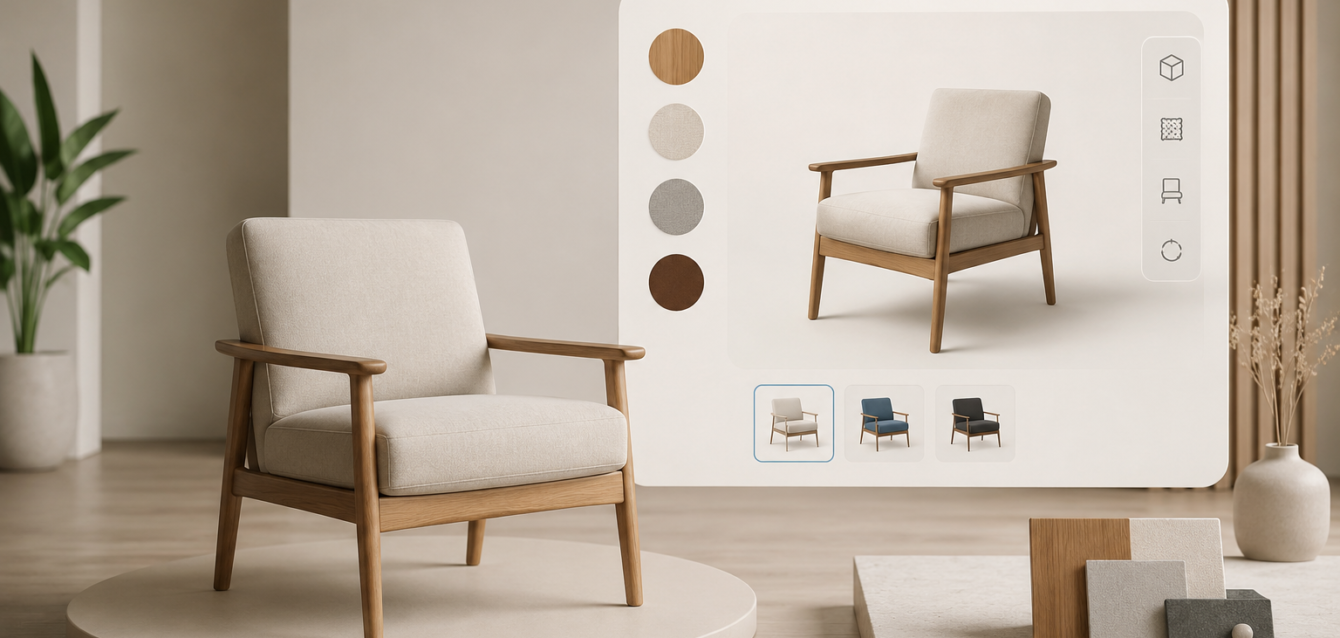
⚡ TL;DR — Quick Answer
3D configurators for furniture brands are interactive web tools that let shoppers customize pieces online — choosing fabric, wood finish, dimensions, hardware, and configuration — while watching a photoreal 3D preview update in real time. US furniture brands deploying these tools report higher engagement, fewer returns, larger average order values, and a sales process that runs 24/7 without a showroom visit. This guide breaks down how the technology works, which furniture categories benefit most, what the ROI looks like, and how to launch a configurator that actually converts.
Why furniture brands need 3D configurators in 2026
Furniture has always been a high-consideration purchase. Buyers want to see exactly what they are getting — the grain of the wood, the texture of the upholstery, how a sectional fits in their living room. Traditional ecommerce struggles with this. A handful of product photos and a dropdown menu for “color” does not answer the questions a buyer has when spending $1,500 on a sofa.
3D product configurators solve this by letting the customer build the piece in front of their eyes. They pick the wood, the fabric, the leg style, the cushion firmness, the dimensions — and the 3D model updates instantly. No more “will this look right?” guessing. No more ordering a swatch and waiting two weeks.
For furniture brands in the USA, this matters more in 2026 than ever before. Online furniture sales continue to grow, but return rates remain a industry-wide problem — often 20–30% for upholstered goods. A 3D configurator reduces returns because buyers see exactly what they are ordering before they click “buy.”
What changed in 2026
Three things shifted that make 3D configurators more accessible and more valuable for furniture brands this year:
1. WebGL is faster. Modern browsers render complex 3D scenes smoothly on mid-range laptops and phones. Your customers do not need a gaming PC to use a configurator.
2. 3D asset costs dropped. Creating a photoreal 3D furniture model used to cost $2,000–$5,000 per piece. In 2026, streamlined pipelines and AI-assisted texturing have brought that closer to $500–$1,500 for most furniture categories.
3. Buyers expect it. Major brands like Wayfair, IKEA, and West Elm have trained consumers to expect interactive product visualization. If your furniture brand does not offer it, it feels like a gap — not a novelty.
How 3D furniture configurators work
A 3D furniture configurator is a web-based application that runs in the browser. Here is what happens behind the scenes:
The 3D model
Each furniture piece starts as a 3D model — a digital replica of the physical product. The model includes accurate dimensions, geometry, and materials. A good model is built to scale, so the configurator can show the piece in the correct proportions alongside other furniture.
The material library
The configurator connects to a material library — a set of digital swatches that represent real-world fabrics, woods, metals, and finishes. When a customer selects “walnut” or “linen charcoal,” the configurator swaps the material on the 3D model instantly. The rendering engine calculates how light interacts with that specific material, so the result looks photographic rather than flat.
The configuration logic
This is where the configurator gets smart. Not every option works with every other option. A modular sectional might have 12 fabric choices, 4 leg finishes, and 3 cushion densities — but some fabrics are not available on certain configurations. The configurator enforces these rules automatically, so the customer never builds an invalid combination.
The real-time preview
As the customer makes selections, the 3D preview updates in real time. They can rotate the piece, zoom in to see fabric texture, and in some configurators, place the furniture in a virtual room to check scale and fit.
The output
When the customer is happy with their configuration, the configurator generates:
- A high-resolution render of the configured piece
- A spec sheet with all selected options and dimensions
- A price quote based on the selected options
- An order-ready SKU or product variant code
Which furniture categories benefit most from 3D configurators
Not every furniture piece needs a configurator. A $40 side table probably does not justify the 3D investment. But for these categories, the ROI is strong:
Upholstered furniture
Sofas, sectionals, armchairs, and ottomans are the sweet spot. Customers care deeply about fabric choice, cushion firmness, leg style, and configuration (L-shape, U-shape, modular). A configurator lets them explore all of this visually instead of trying to imagine it from a product photo.
Case goods and wood furniture
Dining tables, dressers, bookshelves, and beds benefit from wood finish options, hardware choices, and dimensional variations. A dining table configurator might offer 6 wood species, 3 edge profiles, 4 leg designs, and sizes from 60″ to 96″.
Modular and custom furniture
Brands that build modular systems — sectional sofas, shelving units, closet systems, or office furniture — get massive value from configurators. The customer can build their own layout, see it in 3D, and get a parts list and price instantly.
Outdoor furniture
Outdoor furniture involves material choices that affect durability, weight, and look — aluminum vs. teak vs. wicker, cushion fabrics, frame colors. A configurator helps buyers understand their options and feel confident about a purchase they will live with for years.
The ROI: What furniture brands can expect
Higher conversion rates
Furniture brands using 3D configurators typically see conversion rate improvements of 20–40% on configured products. When a buyer can see exactly what they are getting, the hesitation disappears.
Larger average order values
Configurators naturally encourage upselling. A customer who starts with a base sofa discovers that the premium fabric upgrade looks noticeably better in the 3D preview. They add the contrasting throw pillows. They upgrade to the metal legs. Average order value often increases 15–25%.
Fewer returns
This is the biggest win for furniture brands. Returns are expensive — you are shipping a 90-pound sofa back to the warehouse, inspecting it, refurbishing it, and reselling it at a discount. When a buyer configures their piece in 3D, they know exactly what they are getting. Return rates drop by 30–50% on configured products.
Lower customer service load
“How does this fabric look with those legs?” “Will this fit in my space?” “What does the back look like?” These questions eat hours of customer service time. A configurator answers them visually, freeing your team for higher-value conversations.
24/7 selling without a showroom
A 3D configurator is your best salesperson — it works around the clock, never takes a break, and gives every customer the same high-quality experience whether they are browsing at 2 PM or 2 AM.
How to launch a 3D furniture configurator
Step 1: Choose your hero products
Start with 3–5 of your best-selling pieces — the ones where customers ask the most customization questions. Do not try to configure your entire catalog at once. Prove the concept, measure the results, then expand.
Step 2: Create the 3D assets
You need a photoreal 3D model for each piece, plus a material library (fabrics, woods, metals, finishes). If you have CAD files from your manufacturing process, those can often be converted. If not, a 3D artist can build models from product photos and specs.
Step 3: Define your configuration rules
Map out which options are available for each piece, which combinations are valid, and how pricing changes. This is the logic layer that keeps the configurator accurate.
Step 4: Embed the configurator on your website
The configurator runs as a web widget — it loads inside your product page just like an image gallery. No app download, no plugin. It works on desktop, tablet, and mobile.
Step 5: Connect to your ecommerce platform
The configurator should pass the configured product (with all options and pricing) directly into the shopping cart. Whether you use Shopify, WooCommerce, Magento, or a custom platform, the checkout flow should feel seamless.
Step 6: Track and optimize
Once the configurator is live, track conversion rate, average order value, time on page, and return rate. Most brands see the biggest improvements in the first 90 days as customers discover the tool.
Common mistakes furniture brands make with 3D configurators
Low-quality 3D models
A configurator is only as good as its 3D models. If the preview looks like a video game from 2005, buyers will not trust it. Invest in photoreal models with accurate materials, proper lighting, and real-world scale.
Too many options
Choice paralysis is real. If you offer 40 fabrics, 15 wood finishes, 8 leg styles, and 12 sizes, the customer freezes. Curate your options — show the best 6–8 fabrics, the 3 most popular wood finishes, and the sizes that 90% of buyers actually choose.
No mobile optimization
More than 60% of furniture shoppers browse on mobile. If your configurator is sluggish on a phone or requires pinch-and-zoom to see anything, you are losing your largest audience. Test on real devices before launch.
Disconnection from checkout
The configured product needs to flow seamlessly into the cart. If the customer has to call or email to place their custom order, you have added friction instead of removing it. The configurator should output a purchasable product variant.
3D configurators vs. AR: Do you need both?
3D configurators and augmented reality serve different purposes. A configurator lets the customer build their piece — choose options, see variations, and settle on a configuration. AR lets the customer place the finished piece in their room to check scale and fit.
The strongest furniture brands use both: a 3D configurator for the customization process, with an AR preview at the end so the buyer can see the configured sofa in their actual living room. The two technologies work together — configuration drives confidence in the product, and AR drives confidence in the fit.
Cost and timeline for furniture brands
A 3D furniture configurator typically involves:
Setup cost: $8,000–$25,000 depending on the number of products, complexity of configuration rules, and quality of 3D assets. This is a one-time investment.
Per-product cost: $500–$1,500 per furniture piece for 3D modeling and material setup. This drops as you scale — the material library is reusable across products.
Timeline: 4–8 weeks for an initial launch with 3–5 products. Ongoing additions of new products take 1–2 weeks per piece.
Maintenance: Minimal. The configurator runs in the browser and updates automatically. New materials or options can be added without rebuilding the tool.
Why furniture brands choose Ink & Algorithm
At Ink & Algorithm, we build 3D configurators specifically for furniture and home goods brands in the USA. Our configurators are:
- Photoreal — not cartoonish renders. Buyers see materials the way they look in a showroom.
- Mobile-first — smooth performance on phones, not just desktop.
- Integrated — connects to your ecommerce platform so checkout is seamless.
- Scalable — start with 3 products, expand to your full catalog when ready.
- AR-ready — add augmented reality room placement when you want it.
We handle everything — 3D modeling, material library, configuration logic, web integration, and ongoing support. You focus on selling furniture. We focus on the technology that helps you sell more of it.
FAQ: 3D furniture configurators
Do customers actually use 3D configurators?
Yes. Brands that deploy configurators typically see 40–60% of product page visitors interact with the 3D tool. Engagement time on configured product pages is 2–3x higher than standard product pages.
How long does it take to build a 3D furniture configurator?
An initial launch with 3–5 products takes 4–8 weeks. This includes 3D modeling, material library setup, configuration logic, web integration, and testing.
Can I use my existing product photos to create 3D models?
Yes, in most cases. If you have product photos from multiple angles plus dimension specs, a 3D artist can build an accurate model. If you have CAD files from manufacturing, the process is even faster.
Will the configurator work on my ecommerce platform?
Our configurators integrate with Shopify, WooCommerce, Magento, BigCommerce, and custom platforms. The configured product flows directly into your existing checkout.
What happens when I add new furniture pieces?
Adding a new product takes 1–2 weeks. We create the 3D model, add it to the configurator with its available options and materials, and push it live. No rebuild needed.
Ready to launch your 3D furniture configurator?
If you are a furniture brand in the USA looking to increase conversions, reduce returns, and give buyers a showroom-quality experience online, a 3D configurator is one of the highest-ROI investments you can make in 2026.
Contact Ink & Algorithm to discuss your configurator project. We will assess your catalog, recommend the best products to start with, and give you a clear timeline and quote.
Call us: +1 618 965 8617
Email: info@inknalgorithm.com
Website: inknalgorithm.com
Cost & Pricing
| Service | Cost Range | Timeline |
|---|---|---|
| Basic package | $5,000-$15,000 | 2-4 weeks |
| Standard package | $15,000-$50,000 | 4-8 weeks |
| Premium package | $50,000-$150,000+ | 8-16 weeks |