
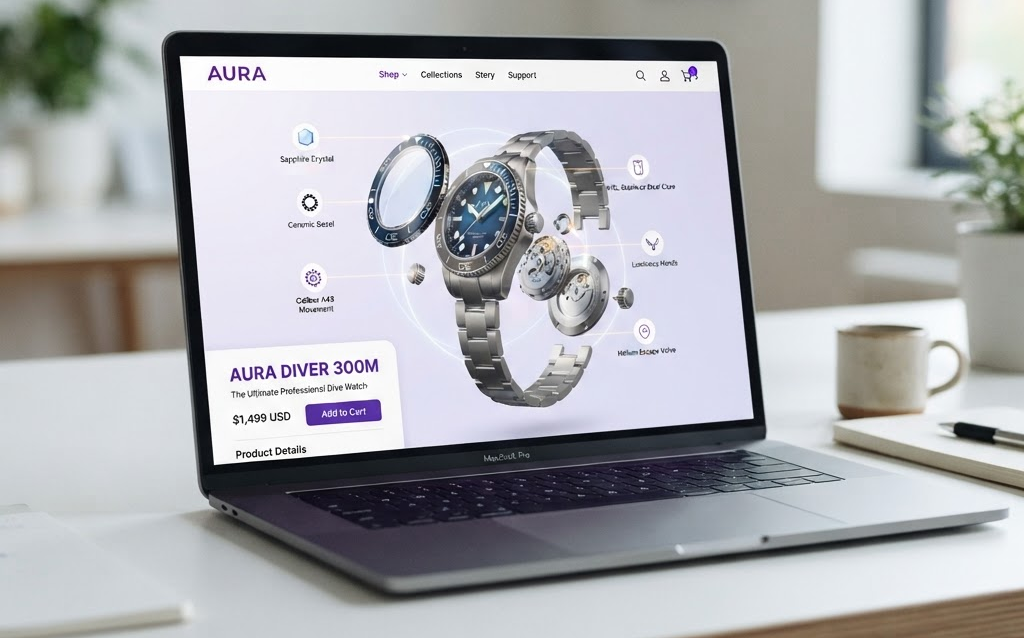
TL;DR: 3D animation on e-commerce product pages—rotating spins, exploded views, and feature demonstrations—increases conversion by 25–40% and time-on-page by 3x. Here’s how to add 3D animation to your product pages, what types perform best, and what it costs in 2026.
Static product photos are the baseline. Every e-commerce site has them. But photos can’t show a product rotating, can’t demonstrate how it works, and can’t show internal components. 3D animation on product pages adds motion that captures attention, demonstrates features, and builds purchase confidence—driving measurable conversion lifts.
Why 3D Animation on Product Pages Works
Motion Captures Attention
When a product page loads and a 3D model starts rotating automatically, the customer’s eye is drawn to it. Motion in an otherwise static page creates immediate visual interest. Studies show that pages with 3D animation have 3x longer average time-on-page compared to pages with static images only.
Demonstration Builds Confidence
A 3D animation can show a product in action—how a watch clasp opens, how a chair reclines, how a gadget assembles. This demonstration answers questions that photos can’t, building the confidence needed to click “Add to Cart.”
Exploded Views Reveal Quality
An exploded view animation—where the product disassembles into components—shows build quality, internal materials, and engineering. This is especially powerful for premium products where customers are paying for quality they can’t see from the outside.
Types of 3D Animation for Product Pages
Auto-Rotating 360° Spin
The product rotates 360° automatically when the page loads, then pauses for user interaction. The customer can drag to rotate manually, zoom in, and examine details. This is the simplest and most effective 3D animation for product pages.
Feature Highlight Animation
The animation highlights specific product features with visual callouts—a zoom into the stitching on a leather bag, a close-up of a watch dial, a cutaway showing internal electronics. These guided tours ensure customers see the most important selling points.
Exploded View
The product disassembles into its component parts, hovers for a moment, then reassembles. This showcases build quality and engineering. Best for electronics, mechanical products, and premium goods.
Before/After Transformation
Shows the product transforming—folded to unfolded, compact to expanded, empty to filled. Best for furniture, storage solutions, and products with transformative features.
Material and Color Variant Loop
The product cycles through available colors and materials in a smooth loop. Each variant appears for 1–2 seconds. This showcases the full product range without requiring the customer to click through multiple images.
How to Implement 3D Animation on Product Pages
Using model-viewer (Google)
The simplest approach. Google’s model-viewer web component loads a GLB model and provides auto-rotate, camera controls, and AR mode out of the box. One line of HTML:
<model-viewer src="product.glb" auto-rotate camera-controls></model-viewer>
This gives you a 3D viewer with auto-rotation for free. Best for basic implementations.
Using Three.js
For more control—custom animations, exploded views, feature highlights—use Three.js. Build a custom 3D viewer that plays specific animation sequences. More development effort but unlimited customization.
Using Shopify’s 3D Model Viewer
If you’re on Shopify, upload GLB files to product media and Shopify’s built-in 3D viewer handles the rest. No custom development needed.
Performance Considerations
3D animation on product pages must not slow down page load. Key optimizations:
- Lazy load 3D content — load the 3D model only when it’s about to enter the viewport
- Compress models with Draco — 70–90% smaller file sizes
- Use KTX2 textures — GPU-native format, 50–80% smaller than PNG
- Target under 2MB per product model for mobile
- Fallback to static image — if 3D fails to load, show the standard product photo
Cost of 3D Animation for Product Pages
| Component | Cost |
|---|---|
| 3D model per product | $300–$2,000 |
| 360° spin animation | $200–$800 (from existing model) |
| Exploded view animation | $1,000–$5,000 |
| Feature highlight animation | $800–$3,000 |
| Implementation (model-viewer) | $500–$2,000 (one-time setup) |
| Implementation (Three.js custom) | $5,000–$20,000 (one-time setup) |
FAQ: 3D Animation for E-commerce Product Pages
Does 3D animation slow down my product pages?
Not if implemented correctly. Lazy loading ensures the 3D model only loads when it enters the viewport. Draco compression reduces model size by 70–90%. KTX2 textures reduce texture size by 50–80%. With proper optimization, 3D content adds under 2MB to page weight—less than many product videos.
How much does it cost to add 3D animation to product pages?
The 3D model costs $300–$2,000 per product. A 360° spin animation from that model costs $200–$800. An exploded view animation costs $1,000–$5,000. Implementation with model-viewer costs $500–$2,000 (one-time). Custom Three.js implementation costs $5,000–$20,000 (one-time). The 3D model is a reusable asset—create it once, use it on product pages, AR, and social media.
Do I need a 3D model for every product?
Start with your top 10–20 best-selling products. These are the pages with the most traffic where 3D animation will have the biggest conversion impact. Scale to the full catalog as you measure results and build your 3D asset library.
Which is better: 3D animation or product video?
3D animation is better for product pages because it’s interactive—customers can rotate, zoom, and explore at their own pace. Video is passive—customers watch what you show them. 3D animation also costs less at scale: one model generates unlimited views, while video requires a new shoot for each angle. Use 3D for product pages and video for social media.
Can I use the same 3D model for animation and AR?
Yes. A GLB model created for product page animation can also be used for AR placement, social media content, and configurators. Build the model once, deploy it everywhere. This is the key advantage of 3D over traditional photography—one asset, unlimited uses.
Getting Started
- Start with your top 5 products — create 3D models and add 360° spins to those pages first
- Use model-viewer — simplest implementation, auto-rotation built in
- Measure conversion impact — compare conversion rates for products with vs without 3D
- Add exploded views for premium products — where build quality is a selling point
- Scale to full catalog — the per-product cost decreases as volume increases
3D animation on product pages isn’t a luxury—it’s a conversion driver that outperforms static images measurably. The brands that adopt it in 2026 will see the data within 30 days: more time on page, more engagement, more sales.
Ready to add 3D animation to your product pages? Contact Ink & Algorithm to discuss your project—we’ll help you create 3D content that drives conversion.